
Apple’s Camera Control has created a new design challenge for leather phone cases. Unlike traditional volume or power buttons, Camera Control is not just a simple press button. According to Apple’s official support guide, users can press, lightly press, double-light-press, and swipe on Camera Control to open the camera, adjust settings, zoom, and control shooting functions.
That means a phone case must do more than “cover a button.”
It must preserve a delicate interaction.
For leather phone case brands, there are two main design choices: a covered independent button or an open cutout. The covered button looks more complete, protects better, and feels more premium when done well. The cutout design gives the smoothest original operation, but it can look less refined and may expose the side area to dust, scratches, and impact.
There is no perfect answer. The right choice depends on product positioning, target users, material, price range, and after-sales risk.
For premium custom leather phone cases, this decision is especially important because leather buyers usually care more about side-line continuity, touch feeling, edge finishing, and long-term appearance than users of basic TPU or plastic cases.
Quick Answer: Cutout or Covered Button?
If your brand prioritizes the most accurate Camera Control experience, choose the open cutout design. If your brand prioritizes premium appearance, full side protection, and a cleaner leather case structure, choose the covered independent button design.
| Design Option | Best For | Main Advantage | Main Risk |
|---|---|---|---|
| Covered independent button | Premium leather cases, business users, high-end OEM projects | Complete appearance, better side protection, more premium feel | Sensitivity loss, mis-touch, higher manufacturing difficulty |
| Open cutout | Photography users, slim cases, lower-risk mass production | Most natural Camera Control operation | Less premium appearance, exposed side area, dust buildup |
| Dual-line strategy | Mature brands with multiple price levels | Covers both user groups | Requires two molds and clearer product positioning |
A simple rule helps:
If the user buys the case mainly for photography, the cutout design is safer.
If the user buys the case mainly for premium leather appearance, the covered button design is more attractive.
Why Camera Control Is Different From Normal Buttons
Many buyers call this area the “AI button” because Camera Control is connected with camera features and Apple Intelligence-related visual functions. However, Apple’s official name is Camera Control.
The difference is important.
A normal phone button only needs to be pressed. Camera Control supports several types of interaction:
- Full press
- Light press
- Double light press
- Swipe gesture
- Camera launch
- Zoom or setting adjustment
This makes case design much harder. A normal covered button can be slightly stiff and still work. A Camera Control cover cannot. If the leather or internal button structure is too thick, the user may lose sensitivity. If the button is too high or too light, the user may trigger it by accident.
That is why many users have mixed feelings about Camera Control cases.
Some want the side of the case to look complete. Others prefer direct access to the original Apple button. Both sides are reasonable.
Option 1: Covered Independent Button Design
A covered independent button means the case fully covers the Camera Control area. Instead of leaving a large opening, the manufacturer adds a separate button structure, thin leather cover, metal insert, conductive layer, or internal pressure-transfer design to let the user operate Camera Control through the case.
For leather cases, this design looks more refined because the side line remains complete.
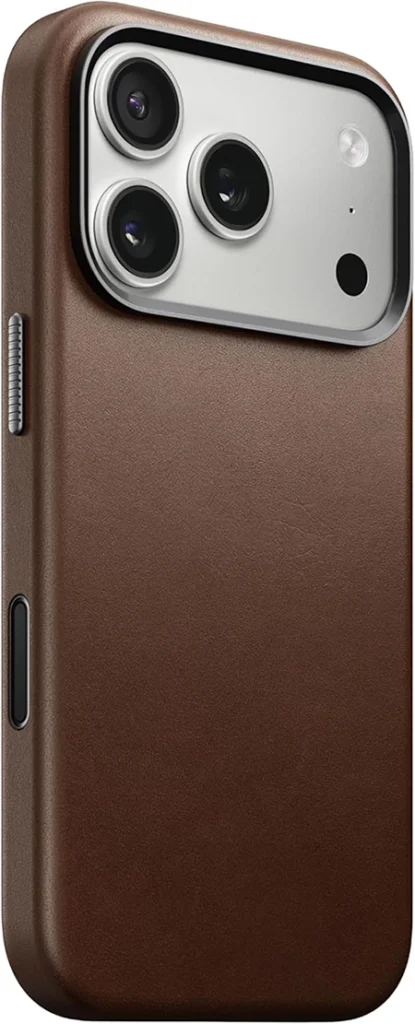
Covered Independent Button Design leather phone case
What Users Like
The biggest advantage is appearance.
Many users feel a covered button design looks more expensive because the side of the case is visually complete. There is no large missing section, no exposed phone frame, and no awkward hole in the leather surface.
This matters more for leather cases than plastic cases.
A leather phone case is not only a protection tool. It is also a style product. Users who choose a genuine leather phone case usually expect a cleaner, more premium finish.
Covered Camera Control design also gives users a stronger feeling of protection. The button area is not exposed, so users feel less worried about side impacts, dust, sweat, or pocket debris entering the gap.
When the design is done well, the covered button can feel close to an official case experience. The user presses naturally, the side frame looks smooth, and the product feels more complete in the hand.
What Users Complain About
The biggest complaint is sensitivity.
Camera Control is not just a click button. It requires subtle pressure and swipe input. If the covered structure is not tuned correctly, users may complain about:
- Hard pressing
- Slow response
- Poor swipe sensitivity
- Double-light-press failure
- Uneven pressure
- Camera opening delay
This is the highest-risk area for covered button designs.
Another common issue is accidental touch. If the independent button protrudes too much or rebounds too easily, users may trigger the camera while holding the phone, putting it into a pocket, or taking it out of a bag. Public user discussions on Reddit and tech forums often mention accidental Camera Control activation as one of the frustrations with the feature itself, so a case design should not make this worse.
Long-term durability is also a concern. Buyers may worry about:
- Button loosening
- Metal insert movement
- Plastic button wear
- Leather deformation around the button
- Reduced sensitivity after long use
For premium leather cases, these problems are more serious because the customer expects a longer product life.
Manufacturing Difficulty
Covered Camera Control design is harder to manufacture because the case must transfer pressure and touch accurately through an extra layer.
For leather cases, the challenge becomes even higher because leather thickness, softness, surface coating, and backing material all affect touch response.
A covered design may require:
- Local leather thinning
- Independent button insert
- Micro-gap control
- Conductive or pressure-transfer layer
- Repeated sensitivity testing
- Tight assembly tolerance
- Long-term press fatigue testing
If the leather is too thick, the button may feel dead. If the internal support is too soft, swipe gestures may become unstable. If the button protrudes too much, accidental touch complaints increase.
Covered button design is attractive, but it is not a low-risk solution.
Option 2: Open Cutout Design
The open cutout design leaves the original Camera Control area exposed. The user touches Apple’s original button directly without any extra case layer between the finger and the device.
This is currently one of the safest solutions for preserving function.
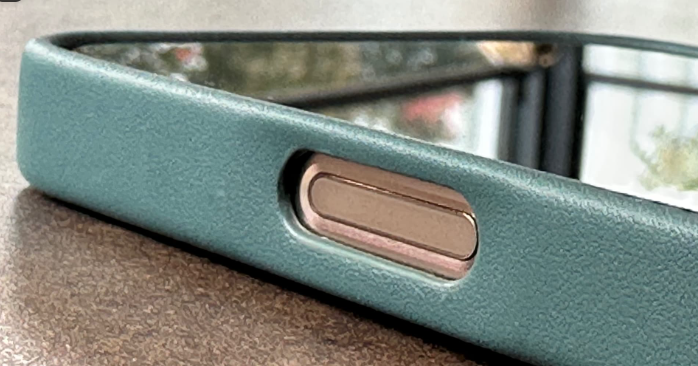
Open Cutout Design leather phone case
What Users Like
The biggest advantage is operation.
Because the user touches the original button directly, the Camera Control experience stays closest to the bare phone. Pressing, light pressing, double-light pressing, and swiping are more natural.
This is especially important for photography users. If someone uses Camera Control often for quick launch, zoom, exposure adjustment, or shooting, even a small loss of sensitivity can become annoying.
The cutout design also avoids mechanical failure. There is no extra button to loosen, no insert to fall out, and no covered structure to wear down.
In mass production, this is a major advantage.
For brands that want fewer returns and faster launch, the cutout design is easier to control.
What Users Complain About
The biggest weakness is appearance.
Many users feel the side of the case looks incomplete. On a leather case, the cutout can look like a missing piece, especially if the opening is large, deep, or poorly finished.
This is a real problem for premium leather products.
A plastic or TPU case can sometimes hide a cutout better because the material is already technical-looking. Leather is different. Leather creates an expectation of continuity, softness, and refinement. A large side opening can interrupt that feeling.
Another complaint is finger comfort. If the cutout edge is too sharp, too deep, or too vertical, the user’s finger may hit the case edge while pressing or swiping. This can make Camera Control feel less comfortable even though the original button is exposed.
Protection is also weaker. The exposed area may collect:
- Dust
- Sweat
- Hand oil
- Pocket lint
- Fine debris
Over time, the cutout area can also age differently from the rest of the case. On an oil wax leather phone case, for example, the leather may develop patina while the exposed phone frame remains visually separate. Some users like this contrast, but others may see it as less premium.
Manufacturing Difficulty
Cutout design is easier than covered button design, but it still requires precision.
For leather cases, the cutout edge must be clean, smooth, and comfortable. A rough opening immediately lowers the perceived quality of the product.
Good cutout design should control:
- Cutout size
- Edge radius
- Edge paint thickness
- Leather fiber exposure
- Finger access angle
- Dust gap
- Visual symmetry
A cutout that is technically functional can still fail commercially if it looks cheap or feels sharp.
User Complaint Comparison
The table below summarizes the most common user reactions.
| User Concern | Covered Independent Button | Open Cutout |
|---|---|---|
| Appearance | More complete and premium | Can look like a missing side section |
| Protection | Better side coverage | Camera Control area exposed |
| Operation | Depends on structure quality | Closest to bare phone |
| Swipe sensitivity | Higher risk of decline | Usually smoothest |
| Accidental touch | Possible if button protrudes too much | Usually lower, but still possible |
| Long-term durability | Button insert may loosen or wear | No extra button failure risk |
| Dust buildup | Lower | Higher around opening |
| Manufacturing risk | Higher | Lower |
| Premium leather feel | Stronger if well made | Weaker if opening looks rough |
This is why neither solution should be described as simply “better.”
The cutout design protects the function.
The covered button design protects the appearance.
The best choice depends on what your customer values more.
How Leather Material Affects Camera Control Design
Material choice changes everything.
A thin top-grain leather may work better for a covered button design because it is easier to control in thickness and surface consistency. Thick full-grain leather may feel more premium, but it can reduce sensitivity if used directly over Camera Control.
PU and some vegan leather materials may look smooth at first, but they can create other risks: coating separation, stiff hand feel, or poor long-term response after repeated pressing.
For buyers still comparing material options, Pellove’s leather types guide can support the material decision before sampling.
In general:
- Full-grain leather is better for premium texture and patina.
- Top-grain leather is often easier for precision button areas.
- Oil-wax leather needs extra testing because surface oils may affect bonding.
- PU leather is lower cost but has higher long-term wear risk.
- Vegan leather quality varies widely and must be tested by grade.
For covered Camera Control designs, the button area may need a different leather treatment from the rest of the case. That is normal. The goal is not only to make the leather beautiful. The goal is to make the button usable.
B2B Recommendation: How Brands Should Choose
For OEM buyers, the choice should be based on product positioning, not personal preference.
Choose Covered Independent Button If:
- Your product is positioned as premium or business-grade.
- Your customers care about complete side lines.
- You want stronger visual differentiation.
- You can afford more sampling and testing.
- You are willing to reject samples with poor sensitivity.
- Your brand wants a more official-case-like experience.
This works best for high-end leather cases, private label projects, business gift collections, and premium packaging lines.
Choose Open Cutout If:
- Your users care most about camera operation.
- Your brand wants lower after-sales risk.
- Your project needs faster mass production.
- Your MOQ is smaller.
- Your product is slim or minimalist.
- You want to avoid button insert failure.
This works best for photography-focused users, slim daily cases, lower-risk OEM orders, and fast-launch product lines.
Use a Dual-Line Strategy If:
Mature brands can use both.
A practical product structure could be:
- Standard line: open cutout version for function-first users
- Premium line: covered button version for users who value appearance and protection
This gives the brand more flexibility. It also reduces the risk of forcing one design to satisfy every user.
A Typical Sourcing Mistake
A common mistake is choosing the covered button design only because it looks better in product photos.
The sample may look clean. The side frame may feel complete. The leather surface may look more premium.
But after real use, the problems appear:
- The user has to press harder.
- Swipe control becomes less smooth.
- Double-light-press is inconsistent.
- The button area feels slightly raised.
- Some users accidentally open the camera.
At that point, the brand has a difficult problem. The case looks better, but the function feels worse.
A better sampling process is to compare both versions before choosing:
- Make one cutout sample.
- Make one covered button sample.
- Test pressing, light pressing, double-light-pressing, and swiping.
- Ask users who actually take photos often to test both.
- Compare complaint risks before final tooling.
For leather case projects, the best-looking design is not always the best-selling design.
Pellove Manufacturing Notes
For Pellove, the most practical approach is not to push one design for every buyer. Different brands need different solutions.
A luxury leather brand may prefer a covered button because the complete side line supports premium positioning. A photography-focused accessory brand may prefer a cutout because it protects the original Camera Control experience. A startup brand may begin with cutout production to reduce sample risk, then develop a covered premium line after receiving market feedback.
For OEM development, Pellove can help buyers compare:
- Leather thickness around the Camera Control area
- Button insert height
- Cutout edge comfort
- Swipe sensitivity
- Pressing force
- Long-term button durability
- Dust gap and side protection
- Material compatibility
- Custom logo and packaging options
[Add Pellove internal test result here: covered button pressing force comparison, swipe sensitivity test, or 10,000-press fatigue test.]
This type of evidence will make the article more convincing and help buyers trust the manufacturing process.
Conclusion
The Camera Control button has changed leather phone case design. A case can no longer be judged only by fit, color, leather grain, or MagSafe strength. It must also preserve a more complex side interaction.
The cutout design gives users the most natural Camera Control experience. It is safer for function, easier for mass production, and better for photography users. However, it can look less premium and may expose the button area to dust, sweat, and impact.
The covered independent button design gives the case a cleaner side profile, better protection, and a more complete leather appearance. But it requires much better engineering. If the button is too stiff, too high, or poorly tuned, users will notice immediately.
For brands, the best decision is not about which solution looks better in a catalog.
It is about matching the design to the user.
If your customer values camera operation above everything, choose the cutout.
If your customer values premium leather appearance and full protection, choose the covered button.
If your brand serves both groups, build two product lines.
That is the most practical way to reduce complaints while keeping the product competitive.
FAQ
What is the Camera Control button on iPhone?
Camera Control is Apple’s side control introduced on iPhone 16 models. It supports pressing, light pressing, double-light-pressing, and swipe gestures for camera-related functions.
Why do some buyers call it the AI button?
Some users call it the AI button because Camera Control can be connected with visual search and Apple Intelligence-related features. However, Apple’s official name is Camera Control.
Is a covered Camera Control button better than a cutout?
Not always. A covered button looks more premium and protects better, but it may reduce sensitivity if poorly made. A cutout gives the most natural operation but can look less complete.
Which design is better for leather phone cases?
For premium leather cases, covered button design often looks better. For photography users and lower-risk mass production, cutout design is usually safer.
Why do users complain about covered Camera Control buttons?
Common complaints include hard pressing, poor swipe sensitivity, double-light-press failure, accidental touch, and long-term button looseness.
Why do users complain about cutout Camera Control cases?
Common complaints include incomplete appearance, sharp cutout edges, lower protection feeling, dust buildup, and exposed side frame.
Should a brand offer both designs?
Yes, if the brand has enough budget and product volume. A cutout version can serve function-first users, while a covered button version can serve premium appearance-focused users.
What should buyers test before mass production?
Buyers should test pressing force, light-press response, swipe smoothness, accidental touch risk, button durability, cutout edge comfort, dust gap, and leather deformation around the Camera Control area.