
Choosing the right laptop sleeve is not simply a matter of matching the sleeve to your laptop’s screen size.
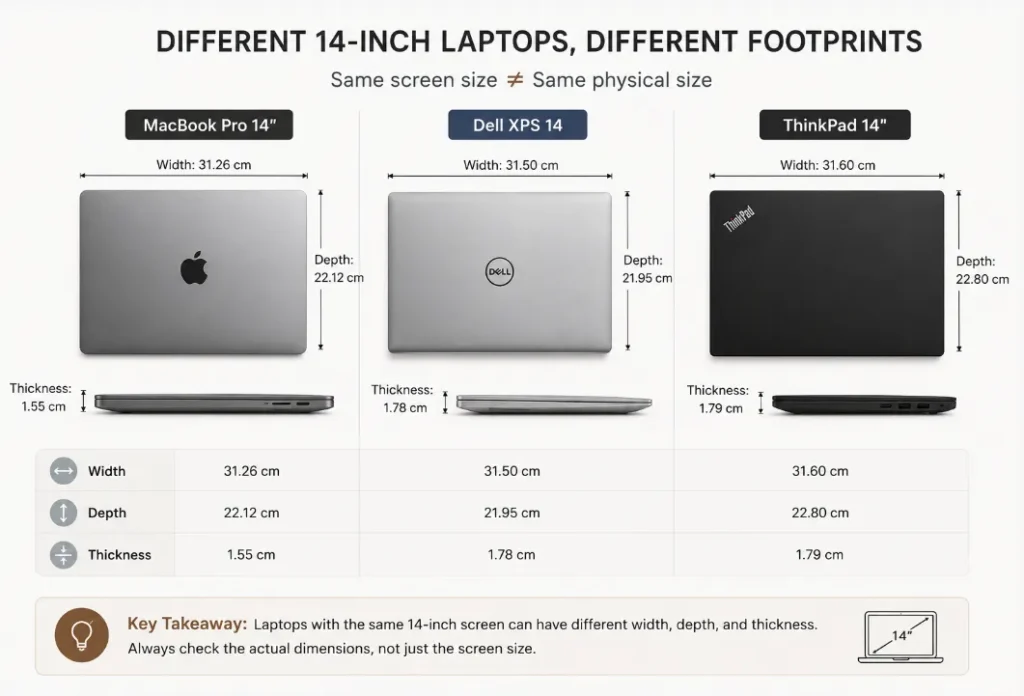
A 14-inch laptop, for example, can have different physical dimensions depending on the model, bezel design, and chassis construction. This is why a sleeve that fits one 14-inch laptop may be too tight or too loose for another.
The most reliable approach is to compare your laptop’s actual dimensions with the sleeve’s finished internal dimensions.
This guide explains how to measure your laptop, how much clearance you need, and what to consider when choosing a leather laptop sleeve.
Quick Answer: What Size Laptop Sleeve Do I Need?
Choose a laptop sleeve based on your laptop’s width, depth, and thickness, rather than screen size alone.
A good fit should:
- Allow the laptop to slide in and out smoothly
- Hold the laptop securely without excessive movement
- Accommodate the laptop’s full thickness
- Allow for any protective case you use
- Provide enough room for the sleeve’s lining and construction
In simple terms:
The sleeve’s finished internal dimensions should be slightly larger than the laptop’s actual dimensions, but not substantially larger.
The ideal fit is secure, comfortable, and compact.
1. Why Screen Size Isn’t Enough
Laptop screen sizes such as 13-inch, 14-inch, 15-inch, and 16-inch refer to the display’s diagonal size, not the laptop’s overall physical dimensions.
Two laptops with the same screen size can have different:
- Width
- Depth
- Thickness
- Bezel size
- Hinge design
- Chassis proportions
Modern thin-bezel laptops can also have a smaller footprint than older laptops with the same screen size.
Therefore, “14-inch laptop sleeve” is only a starting point. Always check your specific laptop’s dimensions before choosing a sleeve.
2. How to Measure Your Laptop
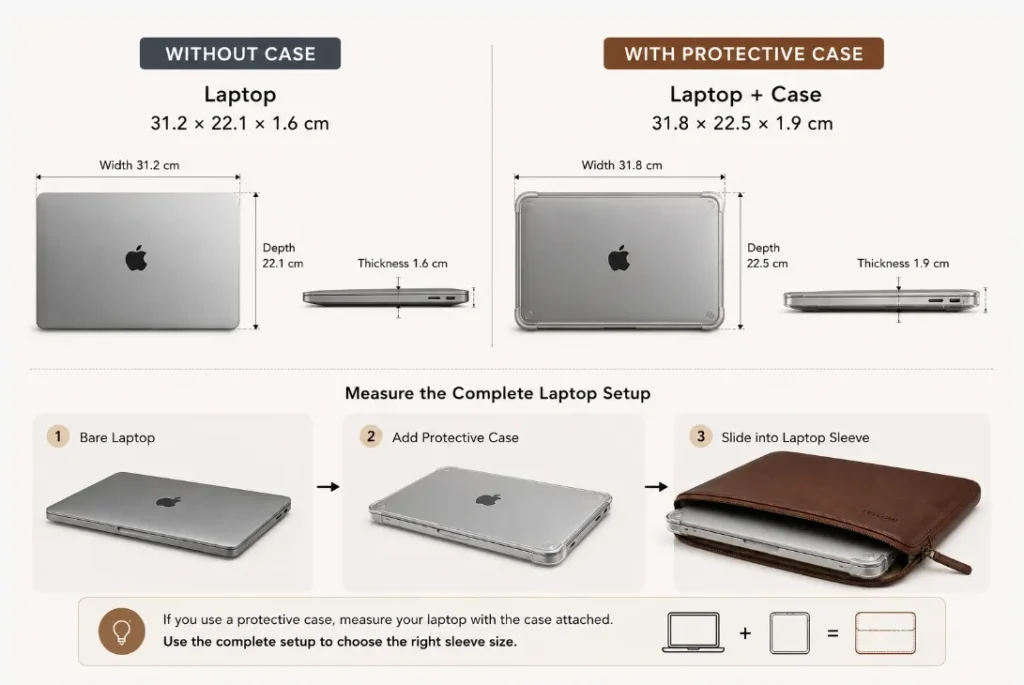
Measure your laptop while it is closed.
You need three measurements:
Width
Measure from the left edge to the right edge.
Depth
Measure from the front edge to the back edge.
Thickness
Measure the laptop at its thickest point when closed.
For example:
Laptop dimensions: 31.2 × 22.1 × 1.6 cm
These measurements are more useful for sleeve selection than the screen size alone.
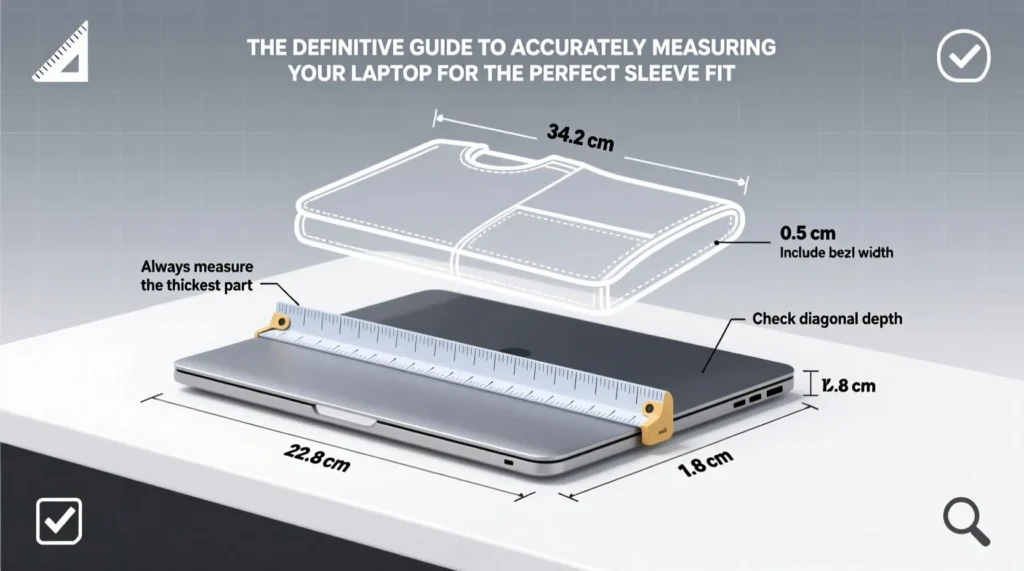
How to measure the dimension
What If You Use a Laptop Case?
If you normally use a hard shell or other protective case, measure the laptop with the case attached.
For example:
Laptop: 31.2 × 22.1 × 1.6 cm
Laptop + case: 31.8 × 22.5 × 1.9 cm
The second measurement should be used when checking sleeve compatibility.
3. Compare Internal, Not External, Dimensions
This is one of the most important rules when choosing a laptop sleeve.
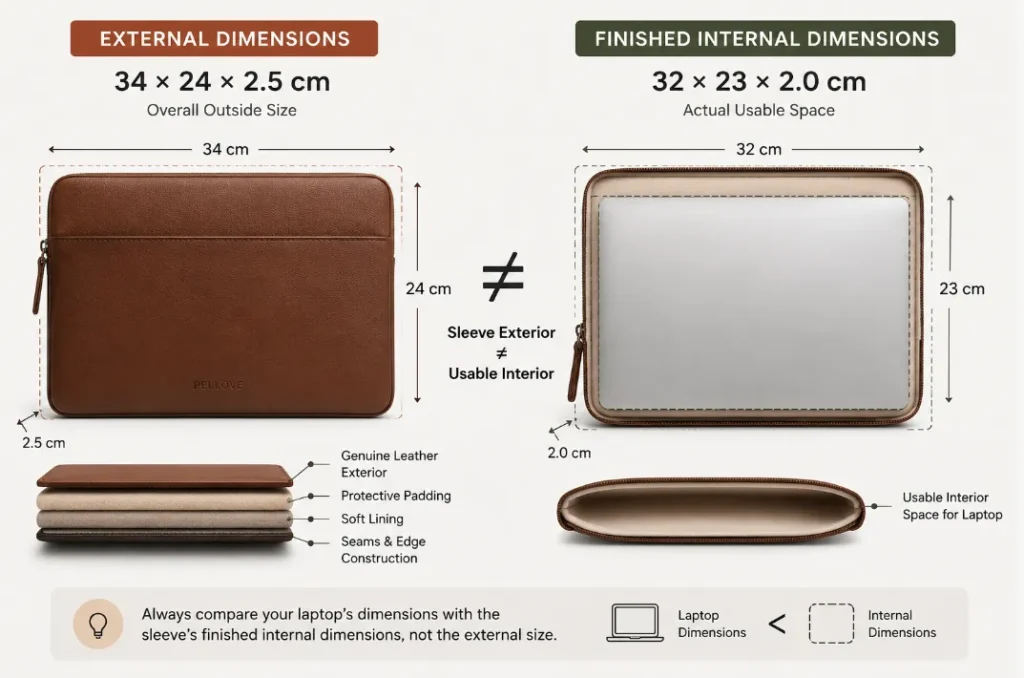
A sleeve’s external dimensions include its:
- Outer material
- Lining
- Padding
- Seams
- Reinforced edges
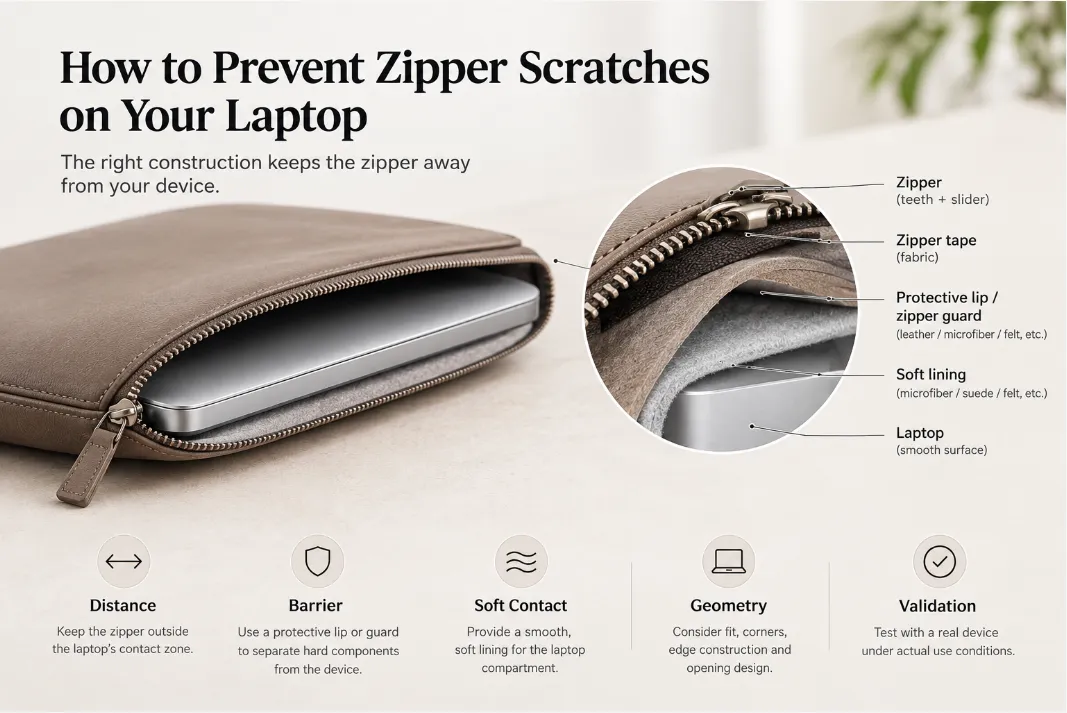
- Zipper or magnetic closure
For example, a sleeve may have external dimensions of 34 × 24 × 2.5 cm, while the actual internal cavity is smaller.
When available, look for specifications such as:
Finished internal dimensions: 32.0 × 23.0 × 2.0 cm
Then compare those dimensions with your laptop.
Internal dimensions determine fit. External dimensions mainly describe the overall size of the sleeve.
Dimension comparison
4. How Much Clearance Should a Laptop Sleeve Have?
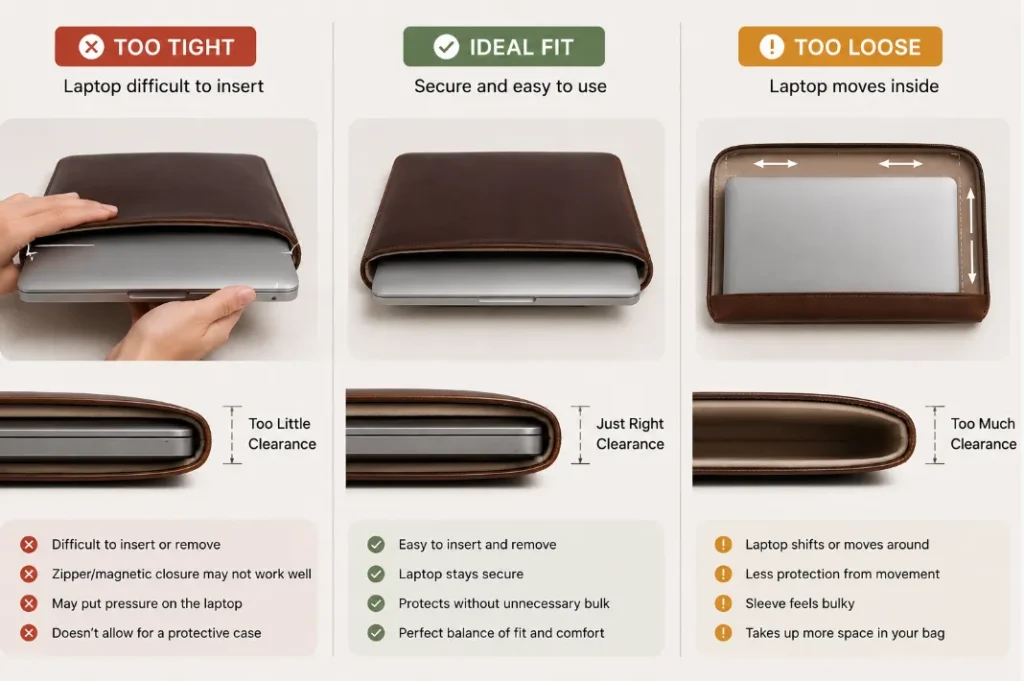
A sleeve should have enough clearance for smooth insertion and removal, but not enough for the laptop to move freely inside.
If the sleeve is too tight:
- The laptop can be difficult to insert
- Removal may require excessive force
- The closure may not work properly
- A protective case may no longer fit
If the sleeve is too loose:
- The laptop can shift inside
- The sleeve may feel bulky
- It takes up unnecessary space in a bag
- The overall fit can look less refined
There is no single clearance measurement that works for every sleeve. A slim unlined sleeve, padded sleeve, and structured leather laptop sleeve can require different allowances depending on their construction.
The key is:
Close enough to keep the laptop stable, with enough room for comfortable everyday use.
Too Tight vs Ideal Fit vs Too Loose
5. Laptop Sleeve Size Guide
Screen size can still be useful as a general reference:
| Laptop Category | Typical Use | What to Check |
|---|---|---|
| 13-inch class | Compact laptops and ultrabooks | Actual width, depth, thickness |
| 14-inch class | Business laptops and ultrabooks | Exact chassis dimensions |
| 15-inch class | Larger productivity laptops | Footprint and thickness |
| 16-inch class | MacBook Pro, workstations, performance laptops | Footprint, thickness, and case |
There is no universal physical size for each screen-size category.
A 14-inch laptop, for example, does not automatically fit every 14-inch sleeve.
6. Can a 14-Inch Laptop Fit in a 15-Inch Sleeve?
It can, depending on the actual dimensions.
If a 15-inch sleeve has an internal cavity that is only slightly larger than your 14-inch laptop, it may provide a good fit.
However, a sleeve that is substantially larger may allow too much movement.
The important question is not:
“What screen size is the sleeve designed for?”
Instead, ask:
“Are the sleeve’s internal dimensions suitable for my laptop?”
7. Why Leather Laptop Sleeve Construction Matters
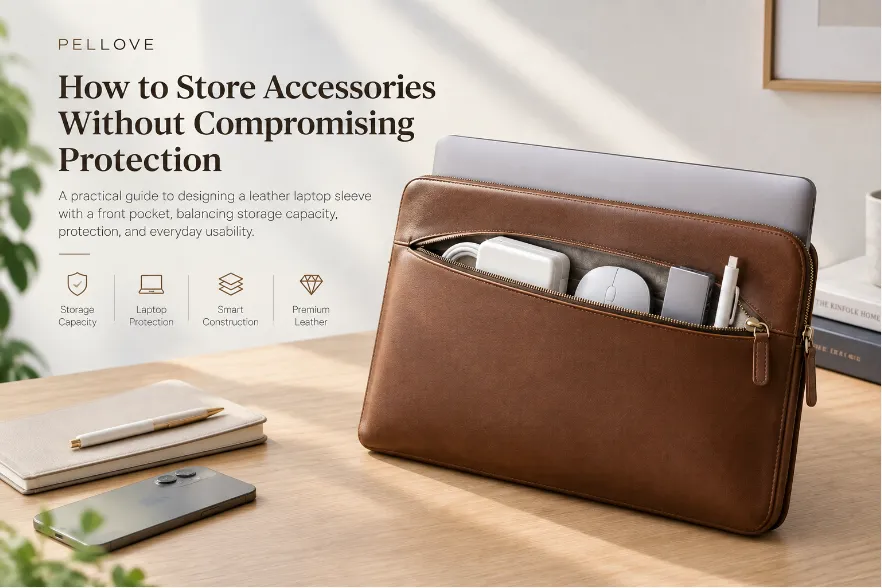
Sizing becomes especially important with a leather laptop sleeve because the material and construction can affect the finished internal cavity.
A leather sleeve may include:
- Genuine leather exterior
- Microfiber or fabric lining
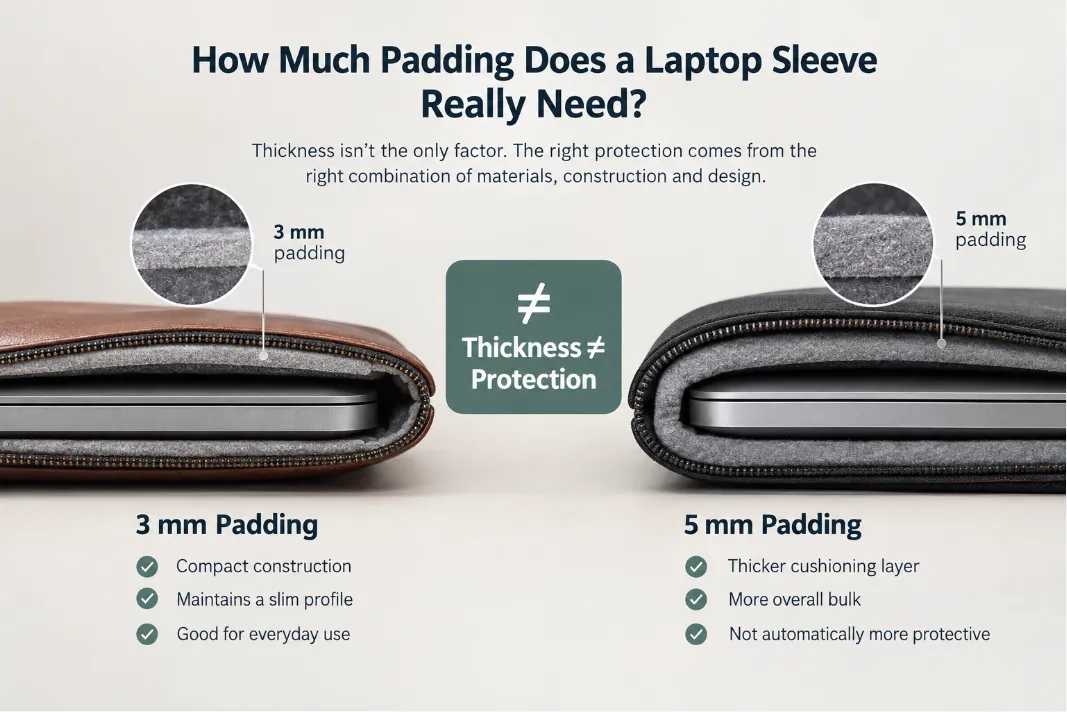
- Protective padding
- Reinforced or folded edges
- Magnetic closure
- Zipper closure
These elements consume space and can make the sleeve’s external dimensions significantly larger than its usable interior.
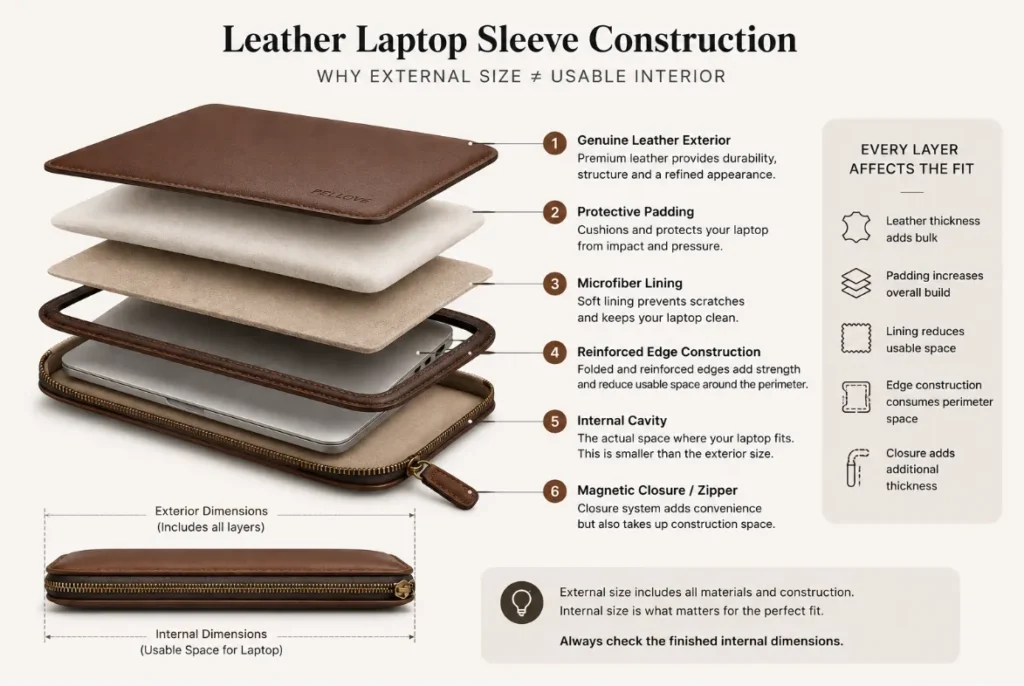
Leather Laptop Sleeve Construction
Leather Thickness
Thicker leather increases the overall construction thickness.
Lining and Padding
A lined or padded sleeve requires more construction space than a simple unlined sleeve.
Edge Construction
Folded or reinforced leather edges can reduce usable internal space around the perimeter.
Opening Design
A sleeve can have adequate internal dimensions but still be difficult to use if its opening is too narrow. Zippers, magnetic flaps, and envelope-style openings therefore need to be considered as part of the overall fit.
For this reason, a well-designed leather laptop sleeve should be engineered around the finished internal cavity, not simply the external dimensions.
8. Common Laptop Sleeve Sizing Mistakes
Choosing by screen size alone
A 14-inch laptop is not necessarily the same size as another 14-inch laptop.
Better approach: Check the manufacturer’s actual dimensions.
Comparing external sleeve dimensions
The exterior includes leather, lining, padding, and construction.
Better approach: Compare the laptop with the sleeve’s internal dimensions.
Ignoring thickness
A laptop can fit in width and depth but still be too thick.
Better approach: Always check all three dimensions.
Forgetting a protective case
A case can increase the laptop’s overall dimensions.
Better approach: Measure the complete laptop setup.
Buying much larger “for extra protection”
Extra space does not automatically mean better protection.
Better approach: Choose enough clearance for comfortable use while keeping the laptop stable.
9. How to Check if a Laptop Sleeve Fits
Use this simple process:
Step 1: Measure the laptop
Record:
Width × Depth × Thickness
Measure it while closed.
Step 2: Check the sleeve’s internal dimensions
Do not rely solely on “13-inch,” “14-inch,” or “16-inch” labels.
Step 3: Consider the complete setup
Check whether you use:
- A protective case
- A sleeve with padding
- A thick leather construction
- A lining
- A zipper or magnetic closure
The laptop should slide in smoothly and remain relatively stable once inside.
10. Frequently Asked Questions
Should a laptop sleeve be tight or loose?
Neither. It should be secure but not restrictive. The laptop should slide in easily without excessive movement.
Should I buy a laptop sleeve one size bigger?
Only if you need additional space for a protective case, accessories, documents, or a thicker laptop.
Does a laptop case change the sleeve size I need?
Yes. If the case stays on the laptop during transport, measure the laptop with the case attached.
Does leather thickness affect laptop sleeve sizing?
Yes. Leather thickness, lining, padding, edge construction, and closure design can all affect the finished internal space.
Can I use one sleeve for different laptops?
Yes, if their actual dimensions are sufficiently similar. However, a sleeve designed around a specific laptop generally provides a more precise fit.
Final Takeaway
The right laptop sleeve size is determined by actual dimensions, not screen size alone.
The simplest method is:
Measure your laptop → check the sleeve’s internal dimensions → allow functional clearance → account for any protective case.
For a leather laptop sleeve, also consider the leather thickness, lining, padding, edge construction, and opening design.
A well-designed sleeve should provide a close, comfortable fit—protective enough to keep the laptop stable, but never so tight that inserting and removing the laptop becomes difficult.