
A laptop sleeve zipper doesn’t automatically scratch your laptop. The risk usually comes from direct or repeated contact between hard zipper components and the laptop surface.
When you position the zipper too close to the laptop compartment, the zipper teeth, slider, or ends can come into contact with the laptop. Compression or loaded accessories can further increase the risk.
For a custom laptop sleeve, treat zipper protection as part of the overall construction, not just a choice of zipper material.
The basic principle is:
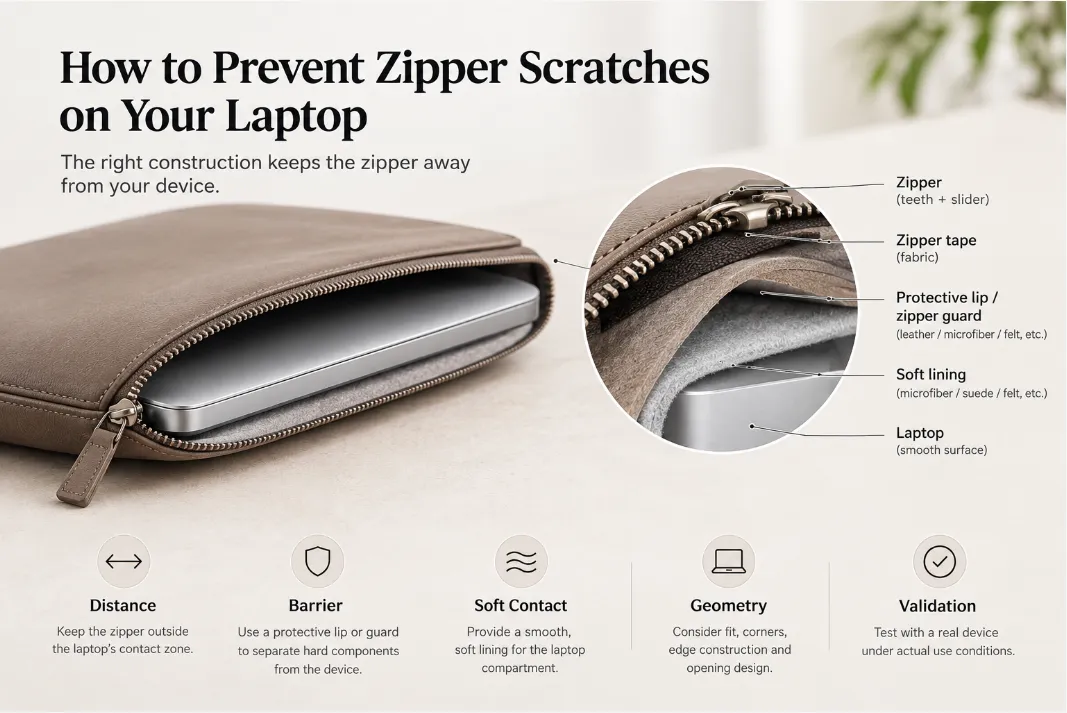
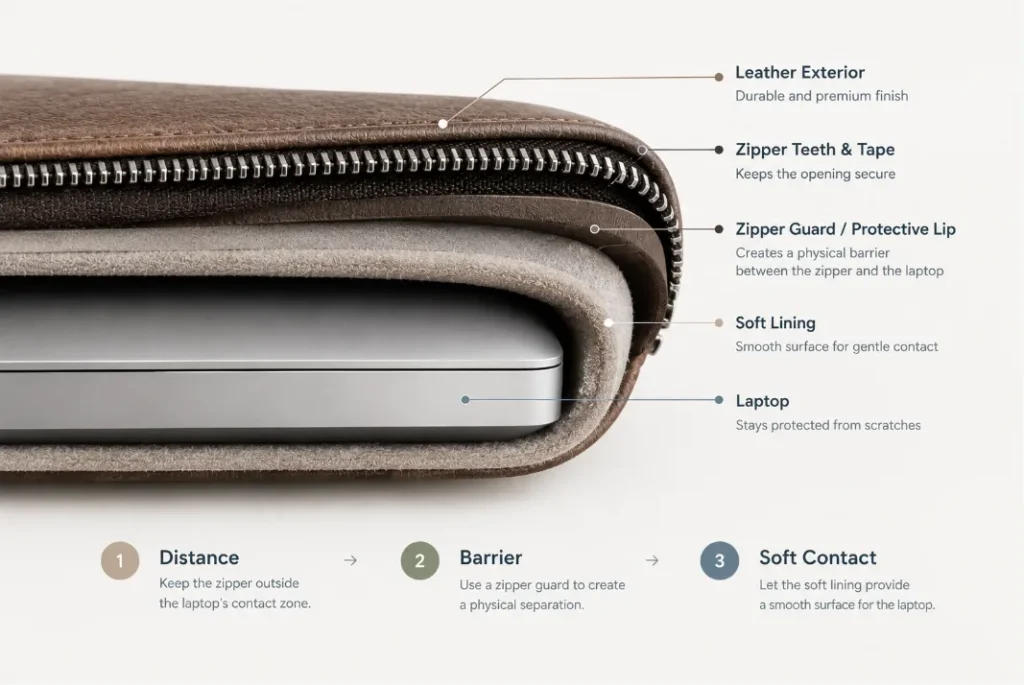
Distance → Barrier → Soft Contact
The zipper should stay outside the laptop’s direct contact zone, a protective structure should separate the zipper from the device, and the laptop compartment should provide a smooth, soft contact surface.
For a broader OEM/ODM development checklist, see our Custom Leather Laptop Sleeve Guide
Why Can a Laptop Sleeve Zipper Scratch a Laptop?
A zipper becomes a potential scratching point when its hard components come close to or contact the laptop during insertion, removal, movement, or normal use.
Several parts of the construction can affect this risk.
Why Can a Laptop Sleeve Zipper Scratch a Laptop?
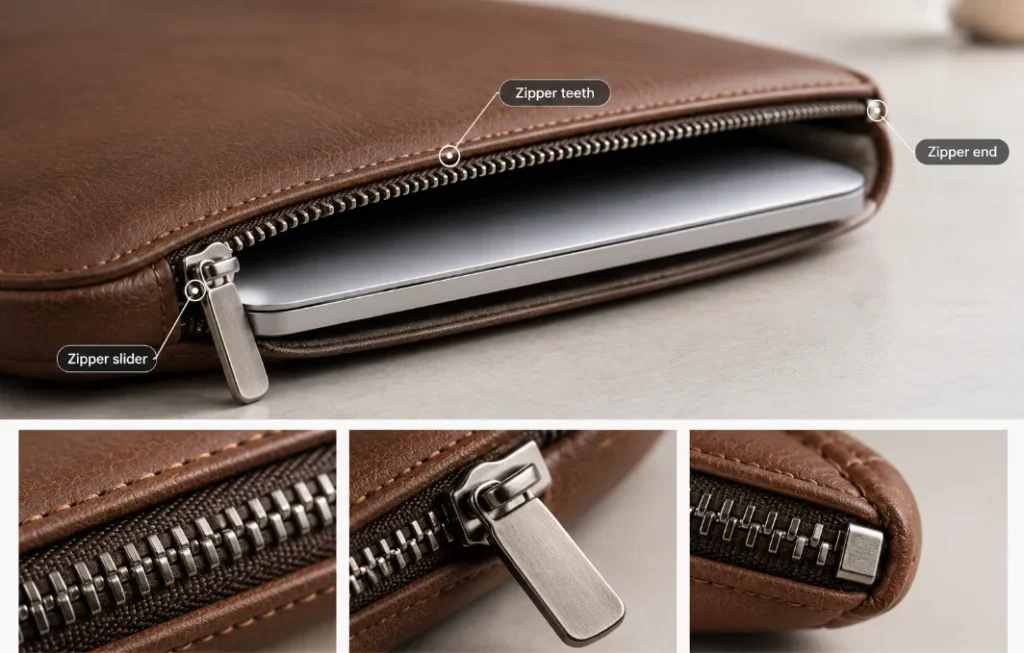
Exposed Zipper Teeth
Zipper teeth are relatively rigid. If they sit directly beside the laptop compartment, they can come close to the laptop when the device is inserted or removed at an angle.
This is particularly important around the opening and corners, where the laptop may not enter perfectly parallel to the sleeve.
The solution is not necessarily to use a softer zipper. A better approach is to prevent the zipper teeth from reaching the laptop’s contact zone through proper placement and structural separation.
The Zipper Slider Creates a Concentrated Contact Point
The zipper slider is larger and more rigid than the zipper tape, making it an important area to consider.
Unlike the zipper teeth, the slider moves along the entire opening. Its position relative to the laptop therefore changes as the zipper is opened and closed.
A sleeve should be designed so that the slider stays separated from the laptop throughout its normal travel path, not only when the zipper is fully closed.
Insufficient Separation
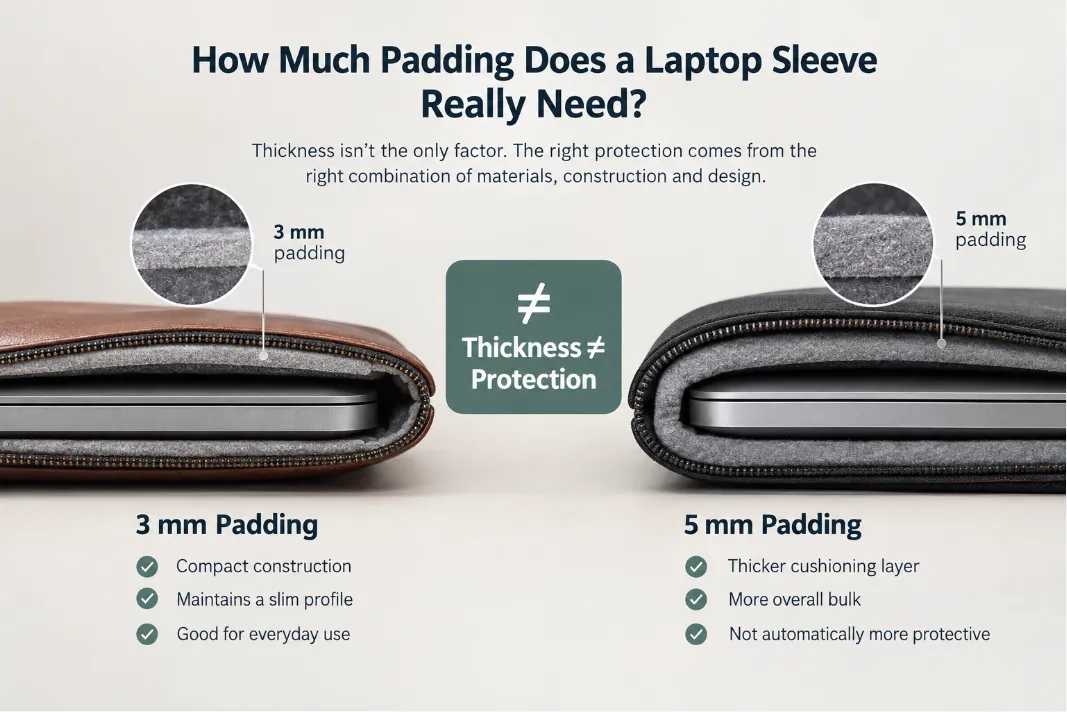
If the zipper is positioned too close to the laptop compartment, a thin layer of lining may not provide enough protection.
This is especially relevant for slim laptop sleeves, where every layer affects the final thickness and available clearance.
Instead of simply adding more padding, the construction should create enough controlled space between the zipper and the laptop.
For slim designs, zipper placement, lining thickness, edge construction, and internal dimensions need to be developed together.
For more information, see our guide on How to Design a Slim Leather Laptop Sleeve Without Sacrificing Protection
Dust and Debris
Dust or small particles trapped between hard components and the laptop can also contribute to abrasion.
Keeping the zipper physically separated from the laptop helps reduce this secondary risk and keeps the laptop’s contact surface easier to maintain.
How Should a Laptop Sleeve Be Designed to Prevent Zipper Scratches?
Zipper protection works best when the zipper is developed as part of the sleeve’s protective structure.
How Should a Laptop Sleeve Be Designed to Prevent Zipper Scratches?
A typical cross-section can be understood as:
Zipper → Zipper Tape → Zipper Guard / Protective Lip → Soft Lining → Laptop
The key is not simply adding more material. The position and relationship of these layers determine whether hard zipper components can reach the laptop.
Keep the Zipper Outside the Contact Zone
The first step is to position the zipper so that its hard components remain outside the laptop’s direct contact area.
The required clearance depends on several factors, including:
- Laptop thickness
- Zipper size and construction
- Slider dimensions
- Lining thickness
- Leather thickness
- Edge construction
- Opening profile
- Laptop insertion angle
A flat pattern does not always show how much clearance will remain after assembly.
The finished prototype should therefore be checked with the actual laptop or a representative device with the same dimensions and thickness.
Add a Zipper Guard or Protective Lip
A zipper guard or protective lip creates a physical barrier between the zipper and the laptop.
Depending on the construction, it can be made from leather, microfiber, synthetic suede, felt, or another soft textile.
The important point is that the guard is not simply a decorative strip. Its width, position, and relationship with the zipper slider determine how effectively it separates hard zipper components from the laptop.
The guard should extend far enough to cover the area that could potentially be reached by the zipper teeth or slider during normal operation.
Its dimensions should be developed together with:
- Zipper size
- Slider geometry
- Zipper position
- Opening width
- Lining thickness
- Edge construction
A guard that is too narrow may still leave part of the slider or zipper teeth exposed. A properly integrated guard can provide physical separation without adding unnecessary bulk.
Control the Zipper Slider’s Travel Path
The zipper should not only be evaluated when fully closed.
As the slider moves along the opening, its position changes relative to the laptop compartment. The construction therefore needs to maintain clearance across the slider’s full operating range.
This can be controlled through a combination of:
- Zipper placement
- Internal clearance
- Protective lips or guards
- Lining extensions
- Opening geometry
During prototype development, operate the zipper with the laptop inside rather than relying only on a visual inspection of the pattern.
Use a Soft, Smooth Lining
The lining provides the final contact surface around the laptop compartment.
Microfiber, synthetic suede, felt, and other soft textiles can help reduce surface abrasion during insertion and removal. For a deeper comparison of these materials, see our guide to Leather Laptop Sleeve Lining: Microfiber, Felt & Other Options
However, lining should not be treated as the only protection. If the zipper slider or teeth can reach the laptop, even a soft lining cannot prevent hard-component contact.
A more reliable construction combines:
Structural Separation + Zipper Guard + Soft Lining
How Sleeve Construction Affects Zipper Protection
Zipper protection is also affected by the overall sleeve construction.
The laptop fit, corners, edge finishing, and accessory storage can all change the distance between the zipper and the device.
Sleeve Fit and Zipper Clearance
A sleeve that is too tight can push the laptop closer to the side walls and zipper area.
It can also make insertion and removal more difficult, increasing the chance that the laptop approaches the zipper opening at an angle.
Internal dimensions should therefore be based on the actual laptop dimensions and reasonable manufacturing tolerances.
If the laptop will be carried inside a separate protective case, that additional thickness should also be considered during development.
The goal is not simply to make the internal dimension as small as possible. It is to achieve a controlled fit with sufficient clearance around the zipper.
Laptop Corners and the Zipper Opening
Laptop corners can come particularly close to the zipper when the device is inserted or removed diagonally.
The design should therefore consider:
- Upper corners
- Zipper ends
- Curved sections
- Changes in zipper direction
- Slider areas
- The transition between the zipper and sleeve opening
A protective lip may work well along a straight zipper section but provide insufficient coverage near a corner or zipper end.
These areas should be checked on the physical prototype.
Edge Construction Around the Zipper
Edge construction can therefore affect not only durability, but also the finished opening geometry. For more detail, see our guide to How to Prevent Leather Laptop Sleeve Edges From Cracking or Peeling
Two common approaches are folded edges and painted edges.
A folded edge wraps the leather around the edge and integrates it into the lining. A painted edge finishes the leather and lining layers together with edge paint.
Neither construction is automatically better for zipper protection.
Instead, consider how the selected edge construction affects:
- Finished edge thickness
- Flexibility
- Lining attachment
- Opening stability
- Zipper position
- Available clearance
The relationship can be summarized as:
Edge Construction → Finished Thickness → Zipper Opening Geometry → Available Clearance
This is particularly important for slim leather sleeves, where changes in edge finishing can affect the usable space around the zipper.
The effect should be evaluated during prototype development rather than after the construction is finalized.
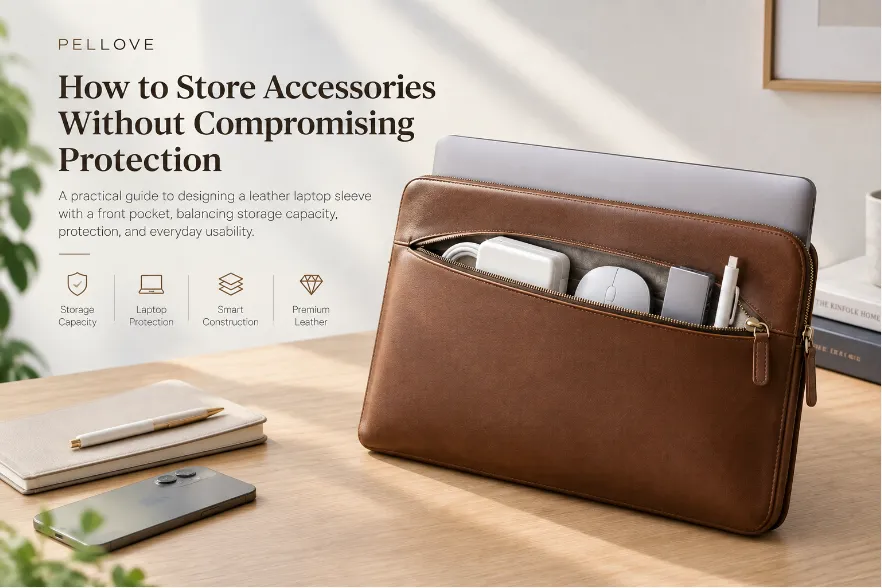
Front-Pocket Pressure
A front pocket can also affect zipper protection when it is loaded with accessories.
A rigid power adapter can create a concentrated pressure point, while cables, a mouse, USB hub, or documents can change the pocket’s overall thickness and shape.
When the front pocket becomes heavily loaded, it can push against the laptop compartment and change the available clearance around the zipper.
This is why a sleeve with accessory storage should be tested both empty and loaded.
Laptop Sleeve With a Front Pocket: How to Store Accessories Without Compromising Protection
Does Zipper Material Matter?
Yes, but zipper material is only one part of the design.
Different zipper constructions can vary in:
- Tooth structure
- Flexibility
- Slider geometry
- Overall thickness
- Movement characteristics
Metal zippers, coil zippers, and other constructions may therefore behave differently in a laptop sleeve.
However, simply choosing a softer zipper does not solve a fundamental clearance problem.
The more important questions are:
- Where is the zipper positioned?
- How far is it from the laptop?
- Can the slider reach the contact zone?
- Is there a protective guard?
- Does the lining provide a smooth contact surface?
- Does the construction maintain clearance when the sleeve is loaded or compressed?
For a custom sleeve, zipper material, placement, guard, lining, and clearance should be developed as one system.
How to Test a Laptop Sleeve for Zipper Protection
Drawings and specifications alone cannot fully confirm zipper protection.
A physical prototype should be tested with the actual laptop or a representative device with matching dimensions and thickness.
1. Test Laptop Insertion
Insert the laptop under normal use conditions, including practical insertion angles.
Check the areas closest to the zipper, particularly:
- Laptop corners
- Zipper teeth
- Slider
- Zipper ends
- Opening transitions
The design should prevent direct zipper-to-laptop contact during normal insertion.
2. Test Laptop Removal
Remove the laptop several times and observe how it moves through the zipper opening.
Pay particular attention to areas where the laptop naturally passes closest to the zipper.
3. Test Slider Travel
Operate the zipper with the laptop inside.
Run the slider through its full operating range and check the closest points between the slider, zipper teeth, protective guard, and laptop.
The objective is to confirm that the zipper components remain separated from the laptop during normal operation.
4. Test Light Compression
A laptop sleeve is often carried inside a backpack, tote, or piece of luggage.
Apply reasonable compression to simulate normal carrying conditions.
Then check whether:
- The zipper guard remains in position
- The lining stays between the zipper and laptop
- The laptop moves closer to the zipper
- The available clearance changes significantly
5. Test With Actual Accessories
If the sleeve includes a front pocket, load it with the accessories it is designed to carry.
For example:
- Power adapter
- Charging cable
- Mouse
- USB hub
- Documents
This test is important because an empty sleeve does not behave the same way as a loaded sleeve.
Accessories can change pressure distribution and reduce the clearance available around the laptop compartment.
6. Test Repeated Use
Operate the zipper repeatedly and inspect the construction afterward.
Check whether the:
- Zipper guard remains correctly positioned
- Lining stays securely attached
- Edge remains stable
- Zipper clearance remains consistent
This helps identify problems that may not be visible during a single-use inspection.
Common Laptop Sleeve Zipper Design Mistakes
Several mistakes can create unnecessary scratching risks:
- Failing to create physical separation: Designers position the zipper directly beside the laptop compartment.
- Relying only on soft lining: Designers rely on the lining to protect the laptop even when hard zipper components can reach it.
- Ignoring slider travel: Designers check the zipper only when it is closed instead of evaluating its full range of movement.
- Allowing insufficient corner clearance: Designers protect the straight sections but overlook the corners and zipper ends.
- Overlooking compression: Designers test the sleeve only when it is empty and relaxed.
- Testing only an empty sleeve: Designers fail to account for accessory pressure in front-pocket designs.
These issues are generally easier to correct during pattern development and prototyping than after bulk production.
What Should Brands Specify When Developing a Custom Laptop Sleeve?
When developing a custom laptop sleeve, zipper protection should be included in the product specification from the beginning.
| Specification | Why It Matters |
|---|---|
| Laptop dimensions | Determines the required internal space and fit |
| Laptop thickness | Affects clearance around the zipper and lining |
| Zipper construction | Influences tooth position, flexibility, and geometry |
| Slider design | Determines the largest and most mobile hard contact point |
| Zipper position | Controls the distance from the laptop compartment |
| Zipper guard | Provides physical separation from hard zipper components |
| Lining | Creates the final soft contact surface |
| Internal clearance | Helps prevent direct zipper-to-laptop contact |
| Corner clearance | Protects areas exposed during angled insertion |
| Edge construction | Changes edge thickness, flexibility, and opening profile |
| Front pocket | Can affect pressure distribution when loaded |
| Accessories | Size, weight, and rigidity can change internal pressure |
| Prototype testing | Confirms the construction under actual-use conditions |
These specifications are interconnected.
For example, changing the zipper size can affect available clearance. Changing the edge construction can change the opening profile. Adding a front pocket can change pressure distribution. Increasing lining thickness can also reduce the available internal space.
For OEM/ODM development, the final prototype should therefore be evaluated as a complete structure rather than as a collection of individual components.
FAQ
Can a zipper really scratch a laptop?
Yes. Hard zipper teeth, sliders, or zipper ends can potentially scratch a laptop if they repeatedly contact the device.
The risk depends on the zipper construction, placement, clearance, and protective structure.
Are metal zippers safe for laptop sleeves?
You can use metal zippers in laptop sleeves, but the zipper material alone does not determine whether the construction protects the laptop.
Designers should position the zipper away from the laptop’s direct contact zone and provide adequate separation and a soft lining.
Is soft lining enough to protect a laptop from a zipper?
Not always.
A soft lining can provide a smooth contact surface, but it cannot compensate for insufficient clearance between the laptop and hard zipper components.
How do you protect a laptop from a zipper inside a sleeve?
The most reliable approach is to combine adequate clearance with a zipper guard or protective lip and a soft lining.
The zipper position, slider geometry, edge construction, and laptop fit should also be evaluated together during prototype development.
How should a custom laptop sleeve be tested?
Test a physical prototype with a laptop or representative device of the correct dimensions and thickness.
Check insertion, removal, slider travel, compression, accessory loading, and repeated zipper operation.
Final Takeaway
Preventing zipper scratches is primarily a construction and clearance problem, not simply a material-selection problem.
A well-designed laptop sleeve should follow five principles:
Distance → Barrier → Soft Contact → Geometry → Validation
Keep the zipper outside the laptop’s direct contact zone. Use a zipper guard or protective lip to create physical separation. Provide a soft, smooth lining. Then evaluate the fit, corners, edge construction, and accessory pressure as part of the complete sleeve structure.
Most importantly, address zipper protection during the pattern and prototype stage, when you can still adjust the zipper position, guard dimensions, lining, and internal clearance.
The goal is simple:
Build the sleeve so that the zipper does not need to touch the laptop in the first place.