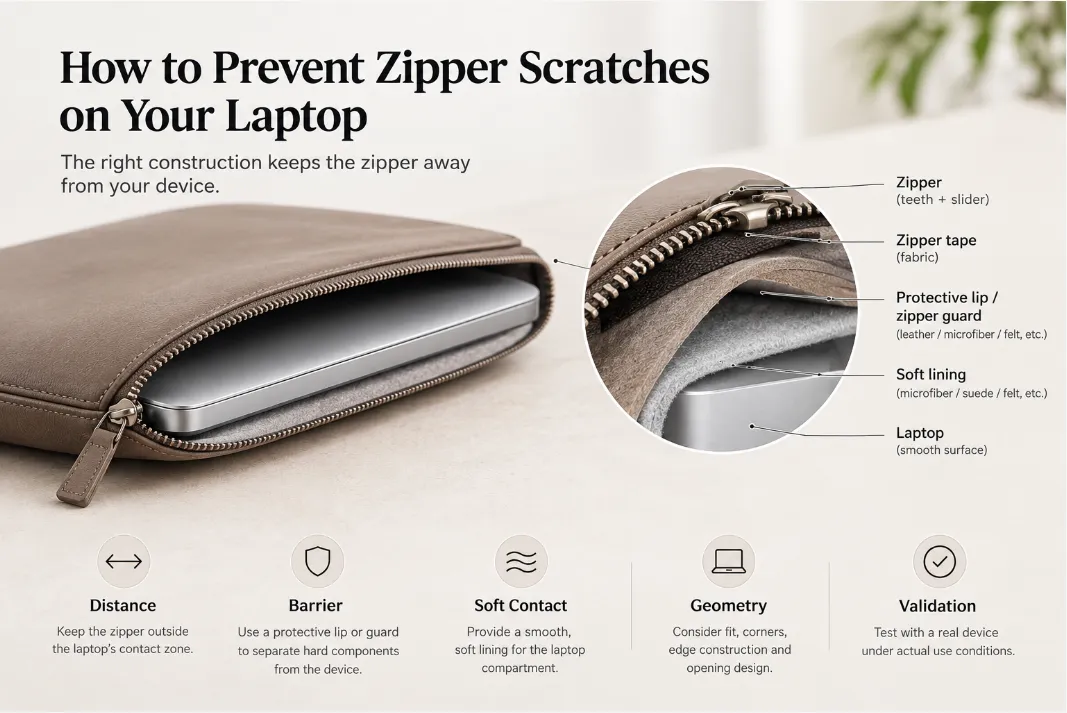

A leather laptop sleeve is often judged by its exterior: the leather quality, grain, color, stitching, and overall finish. But the lining plays an equally important role in the everyday user experience.
The lining is the surface that comes directly into contact with the laptop. It affects how smoothly the device slides in and out, how the interior feels, and how well the sleeve helps reduce scratches and surface abrasion.
For brands developing a custom leather laptop sleeve, lining selection should not be treated as a simple material choice. The lining needs to work with the leather, structural reinforcement, cushioning, adhesive, closure, and target finished thickness as one complete construction.
This guide compares microfiber, felt, fabric, suede, and other lining options, while explaining how to choose a lining according to the product’s design goals and what to confirm with an OEM/ODM manufacturer.
What Does a Laptop Sleeve Lining Do?
The lining is the interior layer that creates a controlled contact surface between the laptop and the sleeve.
A suitable lining can:
- Reduce direct friction during insertion and removal
- Help minimize surface scratches and abrasion
- Improve the softness and feel of the interior
- Cover structural materials and adhesive layers
- Contribute to the appearance of the finished product
- Improve the overall user experience
A basic leather laptop sleeve may use a construction such as:
Leather exterior → structural layer → soft lining → laptop
If additional impact protection is required, the construction may become:
Leather exterior → structural layer → cushioning → soft lining → laptop
Lining Is Not the Same as Cushioning
This distinction is important when developing a laptop sleeve.
A soft lining primarily addresses surface contact, friction, abrasion, and tactile comfort. It is not normally the main impact-absorbing layer.
A structural layer helps maintain the sleeve’s shape and stiffness, while dedicated cushioning can help absorb or distribute impact and compression.
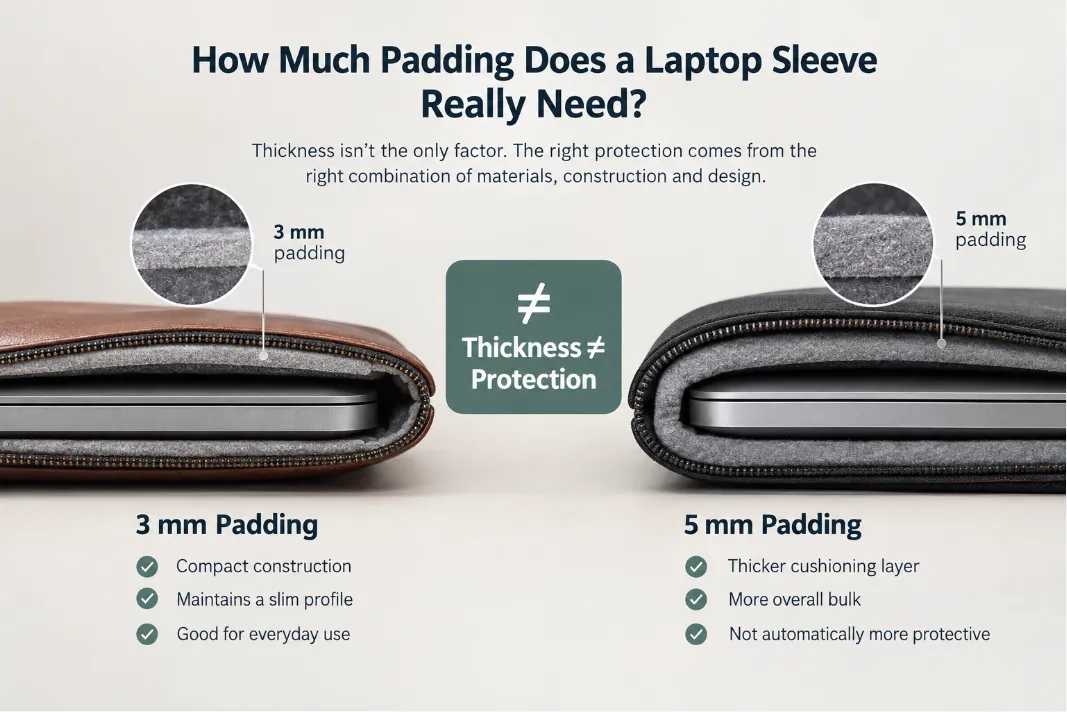
As a result, simply making the lining thicker does not automatically make a laptop sleeve significantly more protective.
For a deeper discussion of protection levels and construction, see How Much Protection Does a Leather Laptop Sleeve Really Provide?
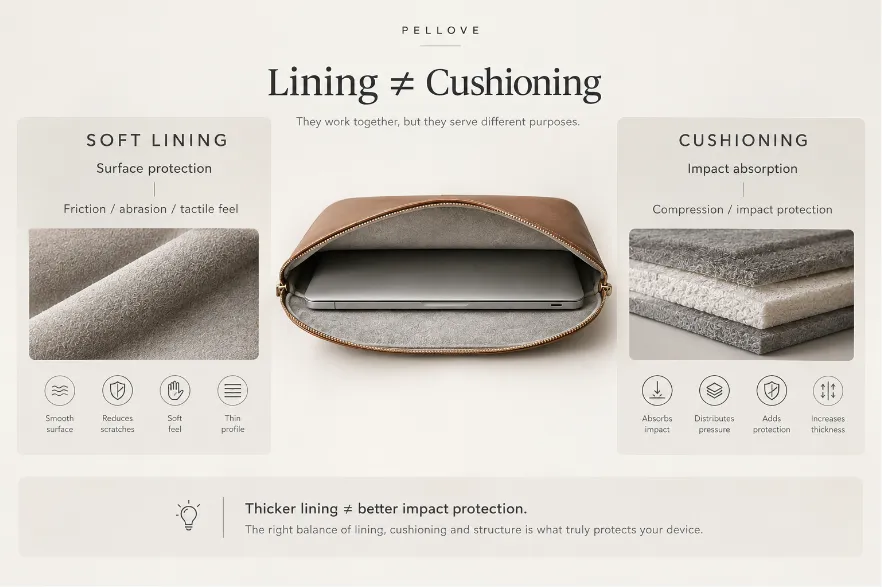
Lining is not equal to cushioning
How to Choose the Right Laptop Sleeve Lining
There is no single lining material that is best for every leather laptop sleeve. The right choice depends on the product’s priorities.
| Product Requirement | Suitable Lining Direction | Main Consideration |
|---|---|---|
| Premium technology product | Microfiber | Soft, smooth, refined contact surface |
| Slim construction | Low-profile microfiber or suitable fabric | Helps control overall thickness |
| Luxury positioning | Suede-like or premium microfiber | Tactile and visual experience |
| Lifestyle / minimalist design | Felt or fabric | Texture and product character |
| Custom colors or patterns | Fabric | Greater design flexibility |
| Cost-sensitive product | Selected felt or fabric | Cost control |
These are starting points rather than fixed specifications. The actual lining should be evaluated according to its surface, density, thickness, backing, abrasion resistance, compression behavior, bonding performance, and cost.
The key question is not:
Which lining material is the best?
It is:
Which lining provides the required surface feel and performance within the product’s thickness, protection, and cost targets?
This becomes particularly important when developing a slim leather laptop sleeve.
Microfiber Lining: A Strong Choice for Premium Laptop Sleeves
Microfiber is a popular choice for premium laptop sleeves because it can provide a soft, smooth contact surface while supporting relatively slim constructions.
Potential advantages include:
- Soft and smooth surface
- Refined hand feel
- Low-profile construction potential
- Wide color selection
- Good compatibility with premium leather
- Suitable for modern technology products
However, “microfiber” is a material category rather than a complete specification.
Two materials may both be described as 0.5 mm microfiber but behave differently during production and in the finished sleeve. Differences in density, surface finish, backing, abrasion resistance, compression behavior, and bonding performance can all affect the final result.
For OEM/ODM development, it is therefore better to specify the actual material characteristics rather than simply requesting “0.5 mm microfiber.”
Important specifications may include:
- Thickness
- Surface texture
- Density
- Backing construction
- Color
- Abrasion resistance
- Compression behavior
- Adhesive compatibility
- Appearance after lamination
When a sleeve has a strict thickness target, these details can matter as much as the nominal material thickness.
Felt Lining: A Practical Option for Lifestyle Designs
Felt provides a different interior character from microfiber. It generally has a more textured surface and can give a sleeve a soft, slightly structured feel.
Felt can be a suitable choice when the product emphasizes:
- Soft contact
- Distinctive texture
- Lightweight construction
- Lifestyle positioning
- Cost control
However, felt performance varies according to fiber composition, density, thickness, and manufacturing process.
For a custom sleeve, buyers should consider:
- Surface smoothness
- Fiber shedding
- Thickness consistency
- Compression resistance
- Abrasion resistance
- Dimensional stability
- Color consistency
Some felt constructions may compress under pressure, but this should not be treated as dedicated impact cushioning.
Felt can work well when its tactile and visual characteristics match the product concept. A thicker felt, however, is not automatically a more protective choice.
Fabric Lining: Flexible for Custom Designs
Woven and knitted fabrics, including polyester- and nylon-based materials, offer greater flexibility when appearance and customization are important.
Fabric can be particularly useful when a product requires:
- Multiple color choices
- Different textures or patterns
- Custom printing
- Lightweight construction
- Cost control
- A more fashion-oriented appearance
Compared with microfiber, fabric can provide greater flexibility in texture, pattern, and visual customization.
However, not every fabric is suitable for direct contact with a laptop.
The contact surface should be evaluated for:
- Smoothness
- Friction
- Abrasion resistance
- Fiber shedding
- Color transfer
- Thickness
- Bonding performance
For a premium sleeve, the least expensive fabric may not deliver the desired interior experience. The performance of the laptop-facing surface matters as much as its appearance.
Suede and Suede-Like Linings
Suede and suede-like materials are often selected when the interior is intended to create a more luxurious and tactile experience.
They can provide:
- Soft hand feel
- Premium visual appearance
- Distinctive interior texture
- Strong compatibility with luxury-oriented leather products
The main trade-offs are thickness, density, surface finish, and cost.
These materials may require more careful construction planning when the sleeve needs to remain slim. For luxury-oriented products, suede-like lining can create a distinctive interior experience. For an ultra-slim sleeve, however, low-profile microfiber or suitable fabric may provide a more practical balance between feel and thickness.
Other Lining Options
Beyond microfiber, felt, fabric, and suede-like materials, manufacturers may also consider:
- Brushed polyester
- Nylon-based fabrics
- Textile blends
- Synthetic suede alternatives
- Other specialized soft-touch fabrics
These options can be useful when a specific surface feel, appearance, weight, or cost target cannot be achieved with the more common materials.
The material name alone, however, is not enough to determine suitability. The selected lining should be evaluated as part of the complete sleeve construction.
Why Lining Thickness Does Not Equal Finished Sleeve Thickness
One of the most common mistakes in product development is treating the specified thickness of the lining as if it were the final thickness of the sleeve.
It is not.
A laptop sleeve is a multi-layer construction. The available thickness has to be shared by:
Leather + structural reinforcement + cushioning + lining + adhesive + edge construction
A lining specified as 0.5 mm does not mean that the finished sleeve will simply gain 0.5 mm from the lining.
The actual result can be influenced by:
- Lining density
- Compressibility
- Backing construction
- Adhesive thickness
- Lamination pressure
- Bonding method
- Folding
- Seam allowances
- Edge construction
- Local reinforcement
Two lining materials with the same nominal thickness can therefore produce different finished results.
For example, one 0.5 mm lining may compress more during lamination than another material with the same nominal thickness. The adhesive layer also becomes part of the finished construction.
This is why material thickness should not be treated as the same thing as finished sleeve thickness.
For a product with a strict thickness target, the completed prototype is a more meaningful reference than the specification of any individual layer.
Build a Thickness Budget for a Slim Laptop Sleeve
When developing a slim laptop sleeve, every layer should have a clear purpose.
Instead of asking only:
“How thin can the lining be?”
it is more useful to ask:
“How much thickness can each layer contribute while still meeting the product requirements?”
A typical construction may allocate thickness across several functional layers:
Leather exterior
Provides the desired appearance, wear resistance, and outer protection.
Structural layer
Provides shape retention and controlled stiffness.
Cushioning
Provides additional impact and compression protection when required.
Soft lining
Provides a smooth contact surface and helps reduce abrasion.
Adhesive and edge construction
Holds the layers together but also contributes to the finished dimensions.
This approach helps prevent a common design problem: adding thickness to one layer without considering its effect on the complete construction.
For more design considerations, see How to Design a Slim Leather Laptop Sleeve Without Sacrificing Protection.
Does a Thicker Lining Provide Better Protection?
Not necessarily.
A thicker lining may change the tactile experience or provide some additional compressibility, but it does not automatically provide better overall impact protection.
A laptop sleeve’s protection is usually the result of several layers working together:
| Layer | Primary Function |
|---|---|
| Leather exterior | Wear resistance, appearance, outer protection |
| Structural layer | Shape retention and stiffness |
| Cushioning | Impact absorption and compression protection |
| Soft lining | Surface protection and contact comfort |
If a product requires greater impact protection, optimizing the appropriate cushioning or structural layer may be more effective than simply increasing lining thickness.
This is especially important for slim designs, where adding material can increase bulk without providing proportional performance benefits.
Microfiber vs. Felt vs. Fabric vs. Suede
The following comparison provides a general starting point for material selection:
| Feature | Microfiber | Felt | Fabric | Suede / Suede-like |
|---|---|---|---|---|
| Surface feel | Very soft and smooth | Soft, slightly textured | Depends on fabric | Soft and tactile |
| Premium feel | High | Medium to high | Varies | High |
| Slim construction | Excellent | Good | Good | Varies |
| Texture options | Moderate | Moderate | High | Moderate |
| Color options | High | High | Very high | High |
| Typical cost | Medium | Low to medium | Low to medium | Medium to high |
| Best suited for | Premium tech products | Lifestyle / minimalist sleeves | Flexible / custom designs | Luxury-oriented products |
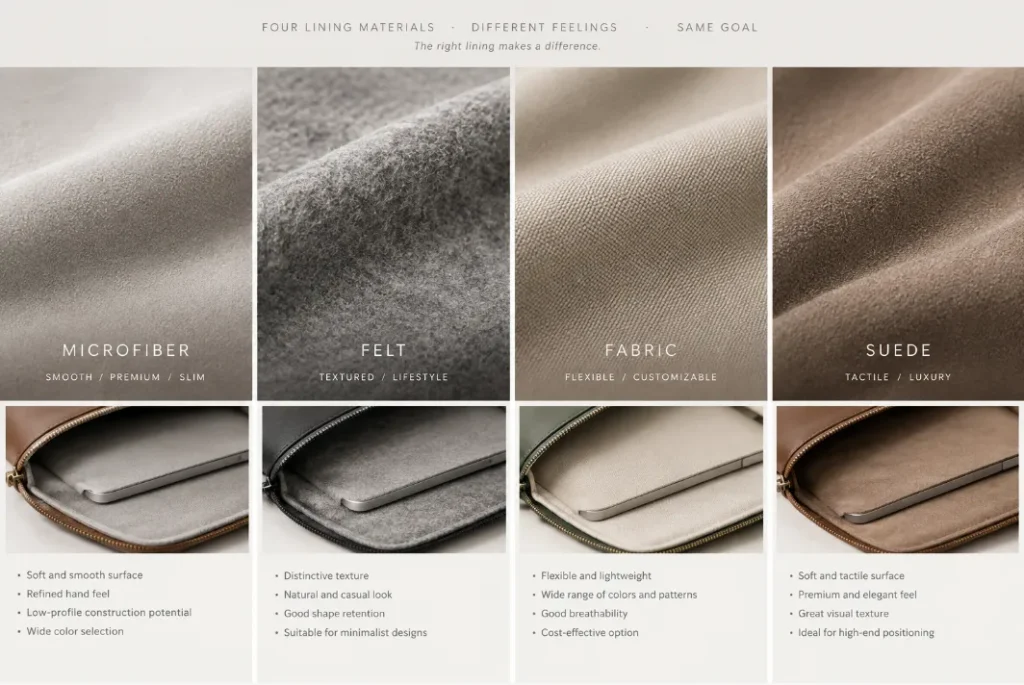
Lining Material comparison
These are general positioning guidelines rather than fixed performance ratings. The actual result depends on the specific material specification and how the lining is integrated into the sleeve.
What Should You Confirm With Your OEM Manufacturer?
When developing a custom leather laptop sleeve, specifying the lining by name and thickness is usually not enough.
Before approving a prototype, consider confirming the following.
1. Material Specification
Confirm the actual lining material, thickness, density, backing, color, and surface finish.
If the material is described only as “microfiber” or “felt,” ask for a more specific material specification or sample.
2. Contact Surface
Evaluate the laptop-facing surface for:
- Softness
- Friction
- Abrasion
- Fiber shedding
- Color transfer
The material should be judged by how it performs against the actual laptop surface, not only by how it feels as a loose swatch.
3. Bonding Method
The adhesive and lamination process can influence:
- Finished thickness
- Surface appearance
- Flexibility
- Bond strength
- Edge behavior
A material that looks ideal before production may behave differently after lamination.
4. Complete Construction
Ask the manufacturer to evaluate the lining together with the leather, structural reinforcement, cushioning, adhesive, and closure.
The lining should not be optimized independently from the rest of the sleeve.
5. Finished Thickness
Do not judge the final thickness from the lining specification alone.
Measure the completed prototype, including areas where the construction changes around edges, seams, closures, and reinforcements.
6. Fit and Usability
Test the sleeve with the target laptop model to check:
- Insertion
- Removal
- Internal fit
- Friction
- Movement inside the sleeve
- Contact with the device
A lining that feels excellent by hand may still be unsuitable if the finished sleeve is too tight or too loose.
7. Prototype Consistency
If the product will move into mass production, confirm that the selected lining and construction can be reproduced consistently at production scale.
A good prototype is not enough if the material, lamination, or finished thickness varies significantly between production batches.
Ask for the Finished Construction, Not Just the Material Specification
For OEM/ODM development, one of the most useful questions is not:
“What thickness is the lining?”
Instead, ask:
“What is the finished construction and thickness after all layers are assembled?”
This gives the development team a more realistic basis for evaluating the product.
For example:
Leather → structural layer → cushioning → microfiber lining
The actual prototype needs to confirm how these materials behave together.
The final result can be affected by the thickness and compression of each material, adhesive application, lamination pressure, folding, stitching, and edge finishing.
For this reason, the complete construction should be evaluated rather than treating each material as an isolated component.
Why Prototyping Matters
Material swatches are useful for comparing color, texture, and basic hand feel, but they cannot completely predict the performance of the finished sleeve.
During prototyping, the manufacturer can evaluate the interaction between:
Leather + reinforcement + cushioning + lining + adhesive + edge construction
This is particularly important when the product has a strict thickness target.
A lining that looks ideal on a material swatch may behave differently after lamination. A material that appears slightly thicker may also produce a better overall result if it provides the desired surface feel and works more effectively with the other layers.
For OEM/ODM development, the prototype should therefore be treated as a construction test, not simply a visual sample.
FAQ
Is microfiber good for a laptop sleeve?
Yes. Microfiber can provide a soft, smooth contact surface and is suitable for many premium laptop sleeve designs. Its actual performance depends on the specific material specification, including surface finish, density, thickness, and backing.
Is felt good for a laptop sleeve?
Felt can be suitable for lifestyle, minimalist, and cost-conscious laptop sleeves. Its suitability depends on factors such as surface smoothness, density, fiber shedding, thickness, and abrasion resistance.
What is the softest lining for a laptop sleeve?
There is no universal answer. Microfiber and suede-like materials can both provide a soft interior, but the actual feel depends on the specific material construction and finishing.
Does laptop sleeve lining protect against drops?
The lining mainly protects the laptop’s surface from contact, friction, and abrasion. Drop and impact protection generally depend more on the overall construction, particularly structural reinforcement and dedicated cushioning.
Does a thicker lining make a laptop sleeve safer?
Not necessarily. Increasing lining thickness can add bulk without providing proportional impact protection. When greater impact protection is required, the appropriate structural and cushioning layers should be considered.
What lining is best for a slim laptop sleeve?
A low-profile microfiber or suitable fabric can be a practical choice. The final decision should be based on the complete construction and finished thickness rather than lining thickness alone.
Can laptop sleeve lining affect final thickness?
Yes. The lining’s thickness, density, backing, compression behavior, adhesive, lamination process, and interaction with other layers can all influence the finished thickness.
Can I customize the lining of a leather laptop sleeve?
Yes. For OEM/ODM projects, the lining can be evaluated according to the product’s required material, color, thickness, surface feel, and construction. The selected lining should be tested as part of the complete sleeve rather than evaluated separately.
The Best Lining Is the One That Fits the Whole Construction
Choosing a laptop sleeve lining is not simply a question of whether microfiber, felt, fabric, or suede is “best.”
Each material offers a different balance of:
- Softness
- Surface protection
- Thickness
- Weight
- Appearance
- Durability
- Manufacturing compatibility
- Cost
More importantly, the lining needs to work with the entire sleeve structure.
A premium leather exterior with an unsuitable lining can compromise the interior experience. A thick lining combined with unnecessary cushioning can make a slim sleeve bulky. An extremely thin lining may fail to deliver the desired tactile quality.
For product developers, the better approach is to define the product requirements first and then select the lining together with the overall construction.
The best lining is not necessarily the thickest, softest, or most expensive option. It is the one that delivers the required surface protection, feel, appearance, and durability within the product’s overall thickness, protection, and cost targets.
If you are developing a custom leather laptop sleeve, the lining can be evaluated together with the leather, reinforcement, cushioning, and target finished thickness during prototype development. Share your target laptop model, preferred leather and lining materials, and target finished thickness with our team to discuss the appropriate construction.