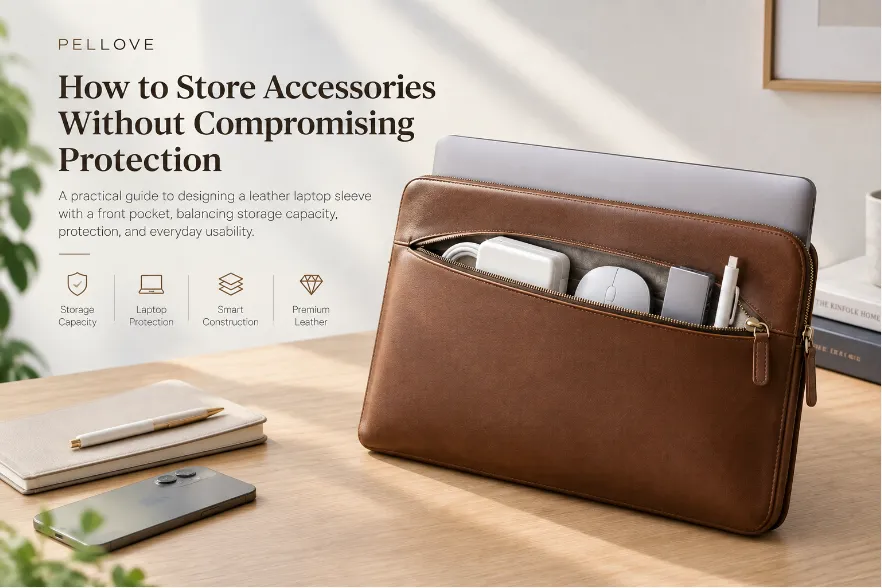

A slim leather laptop sleeve should do more than look elegant. It needs to protect the laptop from everyday scratches, abrasion, minor impacts, and pressure while remaining thin enough for a backpack, briefcase, or tote.
The challenge is finding the right balance between protection, thickness, weight, and usability.
Adding thicker leather or more foam may increase protection in some situations, but it can also make the sleeve unnecessarily bulky. A better approach is to optimize the entire construction.
Precise fit, functional layering, low-profile cushioning, targeted reinforcement, and efficient edge construction can provide meaningful everyday protection without excessive bulk.
This guide explains the key design principles behind a slim and protective leather laptop sleeve.
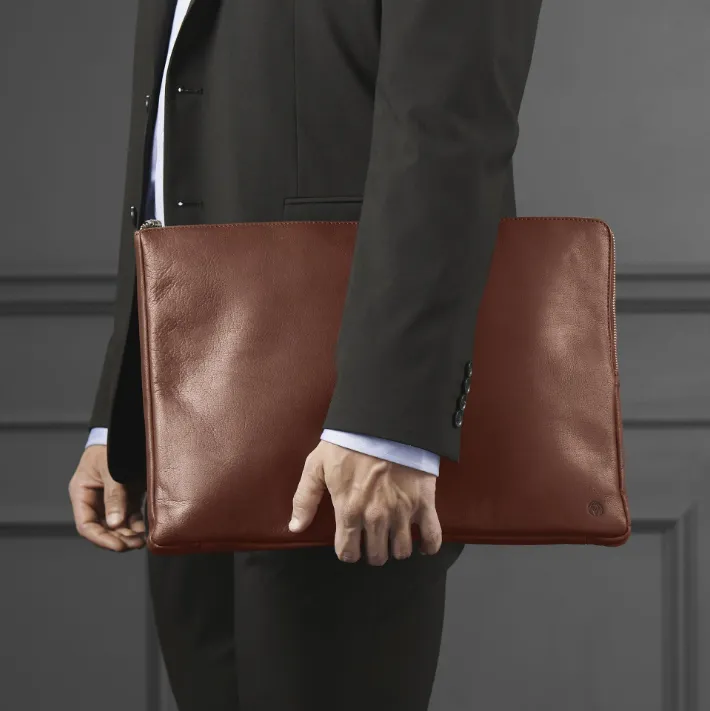
Leather laptop sleeve for everyday use
1. Start With the Laptop, Not the Sleeve
The first step is to define the exact dimensions of the laptop.
Measure:
- Width
- Depth
- Thickness
- Corner radius
- Hinge and chassis protrusions
Screen size alone is not enough. Two laptops with the same screen size can have different physical dimensions.
The internal dimensions should provide enough clearance for smooth insertion and removal without allowing excessive movement.
An oversized sleeve can allow the laptop to shift inside, increasing friction and potential abrasion. An overly tight sleeve can make insertion difficult and place unnecessary stress on the seams and opening.
The goal is:
Secure retention + smooth insertion + minimal unnecessary movement
This is particularly important for slim sleeves because there is less internal space available to compensate for poor fit.
2. Build Protection With Layers, Not Thickness
A well-designed slim laptop sleeve does not need one thick material to perform every protective function.
A typical construction can include:
Leather exterior → structural layer → soft lining → laptop
Each layer has a different role:
| Layer | Main Function |
|---|---|
| Leather exterior | Surface protection, abrasion resistance, appearance |
| Structural layer | Shape retention and dimensional stability |
| Cushioning | Impact and compression absorption |
| Soft lining | Scratch prevention and smooth contact |
This approach is more efficient than simply increasing leather or foam thickness.
The objective is to give every layer a specific purpose and eliminate unnecessary material.
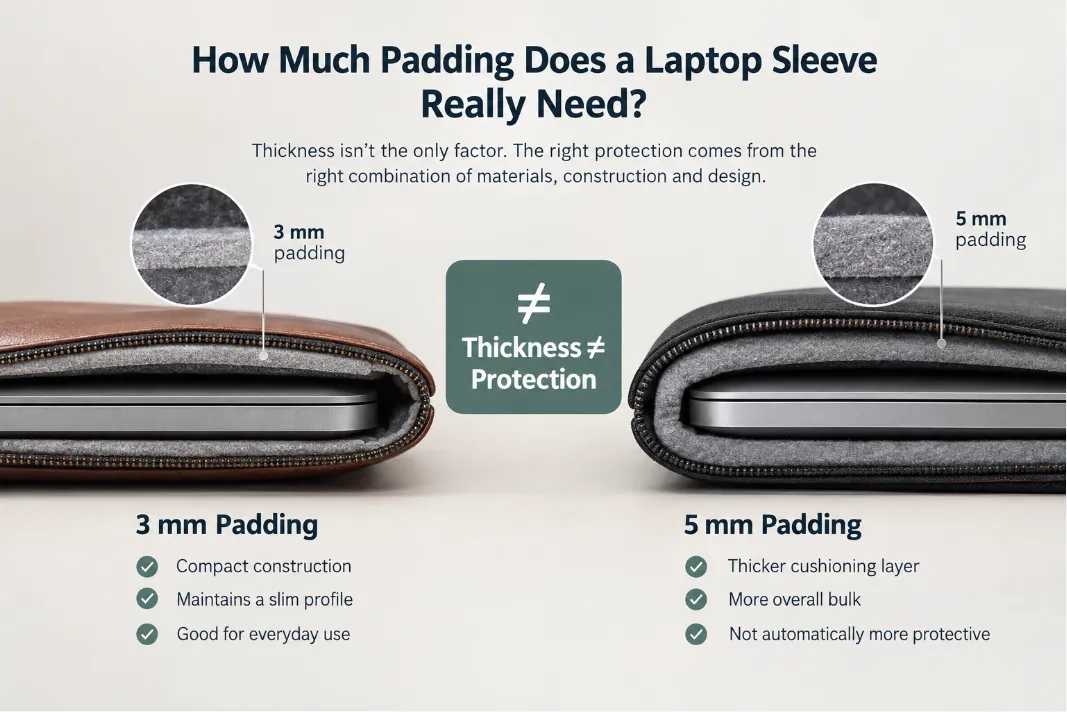
Protection Efficiency Matters More Than Thickness
A thicker sleeve is not automatically a better sleeve.
For example, increasing foam thickness across the entire product may add weight and bulk without providing proportional benefits for everyday use.
Instead, the construction should be optimized around the actual protection requirements.
3. Choose Leather for the Complete Construction
Leather contributes to the sleeve’s:
- Surface durability
- Abrasion resistance
- Structure
- Appearance
- Hand feel
However, leather thickness should not be considered in isolation.
A thicker leather may provide a more substantial hand feel, but it can also increase weight and make folded edges and seams thicker.
For a slim leather laptop sleeve, consider:
Full-Grain Leather
Full-grain leather retains the natural grain and is commonly selected for premium products because of its durability and distinctive surface character.
Top-Grain Leather
Top-grain leather can provide a refined appearance with more controlled surface characteristics and consistent production results.
Genuine Leather
“Genuine leather” describes a broad category rather than a specific performance level. For product development, it is better to specify the required leather quality, thickness, finish, and firmness.
Leather Temper Matters
Two leathers with the same thickness can behave differently depending on their firmness or temper.
A softer leather may provide a more flexible and luxurious hand feel, while firmer leather can offer better shape retention.
Therefore, the ideal leather specification should consider:
Thickness + temper + finish + construction method
rather than thickness alone.
4. Control Finished Thickness, Not Just Leather Thickness
One of the most overlooked aspects of slim sleeve design is the difference between material thickness and finished product thickness.
The final profile depends on:
- Leather
- Cushioning
- Lining
- Structural layers
- Adhesive
- Seam allowances
- Folded edges
- Reinforcement
- Closure components
A sleeve can use relatively thin materials and still become bulky if several layers overlap around the perimeter.
This is why designers should evaluate both:
Overall Thickness
The general thickness of the sleeve.
Local Thickness
The thickness around areas such as:
- Corners
- Seams
- Folded edges
- Opening
- Closure
For a genuinely slim design, controlling local thickness can be just as important as reducing the thickness of the center panel.
5. Use Low-Profile Cushioning
Cushioning helps absorb everyday impacts and reduce the effect of external pressure.
Common materials include:
- EVA foam
- PE foam
- Neoprene
- Other lightweight cushioning materials
However, the thickest foam is not necessarily the best option.
Important properties include:
- Density
- Compression resistance
- Recovery
- Resilience
- Weight
- Long-term durability
A suitable cushioning material can provide useful protection without requiring excessive thickness.
The design objective should therefore be:
Use the minimum practical cushioning needed for the intended protection level.
This is especially important for sleeves designed for daily commuting and business travel, where portability is part of the product experience.
6. Use Zoned Protection Instead of Uniform Padding
One of the most effective ways to reduce bulk is to protect different areas according to their risk.
Not every part of the sleeve needs the same level of reinforcement.
Center Panels
The center of the sleeve can remain relatively thin and focus on:
- Surface protection
- Separation
- Basic cushioning
Corners
Corners are more vulnerable to impacts and can benefit from targeted reinforcement.
Edges
Edges and seams experience repeated bending, pulling, and friction. They may require additional structural support.
Opening
The opening is repeatedly stressed during insertion and removal, so edge durability is important.
Closure
The closure needs reliable retention without creating excessive local thickness.
This creates a simple principle:
Put protection where it matters most, rather than making the entire sleeve thicker.
7. Reinforce Corners Without Bulking Up the Entire Sleeve
Corners are among the most important areas to consider when designing a protective laptop sleeve.
Instead of adding thick padding across the entire surface, reinforcement can be concentrated around vulnerable areas.
Possible approaches include:
- Additional cushioning
- Layered leather
- Thin structural inserts
- Reinforced stitching
- Localized reinforcement layers
The appropriate solution depends on the desired protection level and target thickness.
For a slim sleeve, targeted reinforcement generally provides a better balance between impact protection and portability than uniform heavy padding.
8. Optimize Edges and Seams
A sleeve may look thin at the center but become noticeably thicker around its perimeter.
This often happens because of:
- Folded leather
- Overlapping layers
- Seam allowances
- Reinforcement
- Binding
- Multiple material transitions
Construction should therefore be considered from the beginning of the design process.
Skiving
Leather skiving can reduce material thickness in selected areas where multiple layers overlap.
It can be useful around:
- Folded edges
- Seam areas
- Layer transitions
- Closure sections
The goal is not to make every part of the leather thinner.
It is to remove unnecessary material where layers would otherwise accumulate.
This helps maintain a cleaner profile while preserving the required structural strength.
9. Select a Low-Profile Closure
The closure system can significantly affect the sleeve’s final thickness.
Common options include:
- Magnetic closure
- Zipper
- Envelope flap
- Snap closure
For minimalist designs, magnetic and envelope closures can offer a clean appearance with relatively little external hardware.
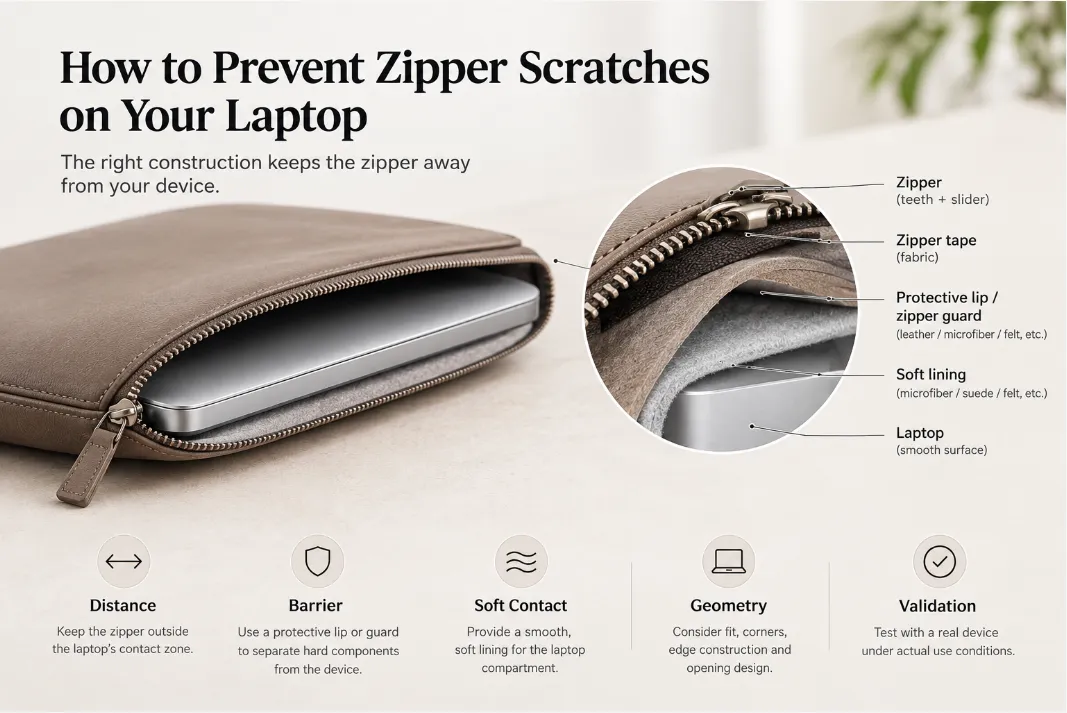
Zippers provide secure full closure but can add local thickness through the zipper tape, teeth, puller, and protective construction.
Whatever system is selected, evaluate:
- Retention
- Ease of use
- Local thickness
- Hardware weight
- Contact with the laptop
- Long-term durability
The closure should be treated as part of the complete layer stack, not as an independent component.
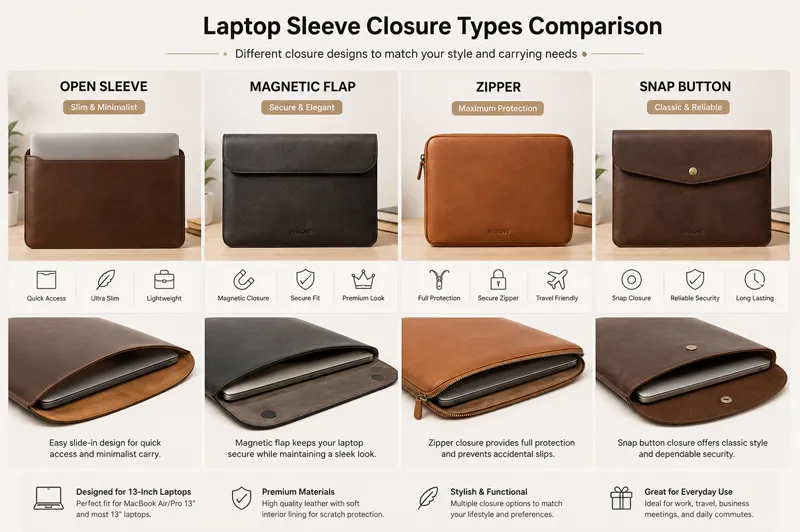
Laptop Sleeve Closure Types Comparison
10. Balance Protection, Weight, and Usability
A slim sleeve should not be optimized for thickness alone.
A practical design must balance:
Protection + Thickness + Weight + Usability
A sleeve that is extremely thin but difficult to insert is not a successful design.
Similarly, a heavily padded sleeve may provide more impact resistance but become inconvenient to carry.
Consider:
- Insertion and removal
- Internal movement
- Closure force
- Sleeve flexibility
- Finished weight
- Finished thickness
For everyday commuting, the best design is often one that provides sufficient protection with minimal unnecessary bulk.
11. Prototype the Complete Construction
Material specifications alone cannot predict how a finished leather laptop sleeve will perform.
A physical prototype should be evaluated for:
Fit
Does the laptop enter and exit smoothly?
Thickness
What is the actual thickness at the center and thickest areas?
Weight
Does the finished product meet the intended portability target?
Closure
Does the closure provide reliable retention without excessive bulk?
Edges
Do seams and folded areas create unwanted thickness?
Protection
Are corners and vulnerable areas adequately reinforced?
Prototype testing is particularly important because small changes in leather thickness, foam density, skiving, or layer alignment can significantly affect the final product.
12. Test the Sleeve as a Complete System
The performance of a laptop sleeve comes from the interaction of all its components.
Depending on the intended application, testing may include:
- Drop testing
- Compression testing
- Abrasion testing
- Seam strength testing
- Closure cycle testing
- Fit and dimensional checks
Pay particular attention to:
Corners + edges + opening + closure
These areas often experience more stress than the center panel.
For mass production, prototype results should ultimately be translated into clear material, dimensional, and quality-control specifications.
Common Slim Laptop Sleeve Design Mistakes
Making the leather too thin
Extreme leather reduction can compromise structure, durability, and edge quality.
Adding thick foam everywhere
Uniform padding increases bulk without necessarily providing the most efficient protection.
Ignoring local thickness
Folded edges, seams, and reinforcement can make the sleeve much thicker than expected.
Designing the exterior dimensions first
The outside dimensions should be derived from:
Laptop dimensions + clearance + layer stack + construction allowance
Adding unnecessary hardware
Large pulls, snaps, decorative hardware, or oversized magnets can increase weight and local bulk.
Optimizing for minimum thickness only
The thinnest possible sleeve is not necessarily the best-designed sleeve.
The real objective is:
Less unnecessary material, not less necessary protection.
A Practical Design Formula
For a slim leather laptop sleeve, the design process can be summarized as:
Precise Fit
↓
Functional Layering
↓
Low-Profile Cushioning
↓
Zoned Protection
↓
Efficient Edge Construction
↓
Prototype & Testing
The result should be a sleeve that protects the laptop from everyday risks while remaining lightweight, portable, and visually refined.
Developing a Custom Slim Leather Laptop Sleeve
For brands developing a custom or private-label leather laptop sleeve, the most important specifications should be defined together rather than independently.
A development brief should include:
- Laptop model and dimensions
- Target internal clearance
- Leather type and thickness
- Leather temper and finish
- Cushioning material
- Lining
- Corner reinforcement
- Edge construction
- Closure system
- Target finished thickness
- Target weight
- Logo application
- Packaging
- Testing requirements
Changing one component can affect the entire construction.
For example, thicker leather may increase edge thickness. Different cushioning may change internal dimensions. A new closure may increase local bulk. Additional reinforcement may affect both weight and sewing requirements.
This is why a slim laptop sleeve should be developed as a complete product system, from material selection through prototype and production.
Frequently Asked Questions
How thick should a slim leather laptop sleeve be?
There is no universal thickness standard. The appropriate finished thickness depends on the laptop, leather, cushioning, lining, protection target, and construction. A slim sleeve should be evaluated based on its complete layer stack rather than leather thickness alone.
Does thicker leather provide better laptop protection?
Not necessarily. Leather primarily contributes surface durability, abrasion resistance, structure, and appearance. Impact protection depends more heavily on the complete construction, including cushioning and reinforcement.
What is the best padding for a slim laptop sleeve?
There is no single best material. EVA, PE, PU, and other cushioning materials can be considered depending on density, compression behavior, resilience, weight, and the required protection level.
Should a slim laptop sleeve have corner protection?
If the sleeve is intended to provide more than basic scratch protection, targeted corner reinforcement can improve protection without requiring heavy padding across the entire sleeve.
Can a leather laptop sleeve be customized for a specific laptop?
Yes. Custom sleeves can be developed around specific laptop dimensions, materials, protection requirements, closure systems, branding, and packaging specifications.
Final Thoughts
Designing a slim leather laptop sleeve is not about making every component thinner.
It is about using each layer efficiently.
The best designs combine:
Precise fit + functional layers + low-profile cushioning + targeted reinforcement + efficient construction + testing.
The goal is not to create the thinnest possible sleeve.
It is to create a sleeve that is as slim as necessary while maintaining the protection, durability, usability, and premium feel the product requires.
For custom leather laptop sleeve development, the ideal construction will depend on the laptop model, target protection level, materials, finished thickness, weight, and production requirements.
Every layer should have a purpose—and every millimeter should earn its place.