
A laptop sleeve does not need to be heavily padded to provide useful protection.
The right amount of padding depends on more than thickness. Material characteristics, compression behavior, placement, laptop fit, accessory load, and overall construction all affect how a sleeve protects a laptop.
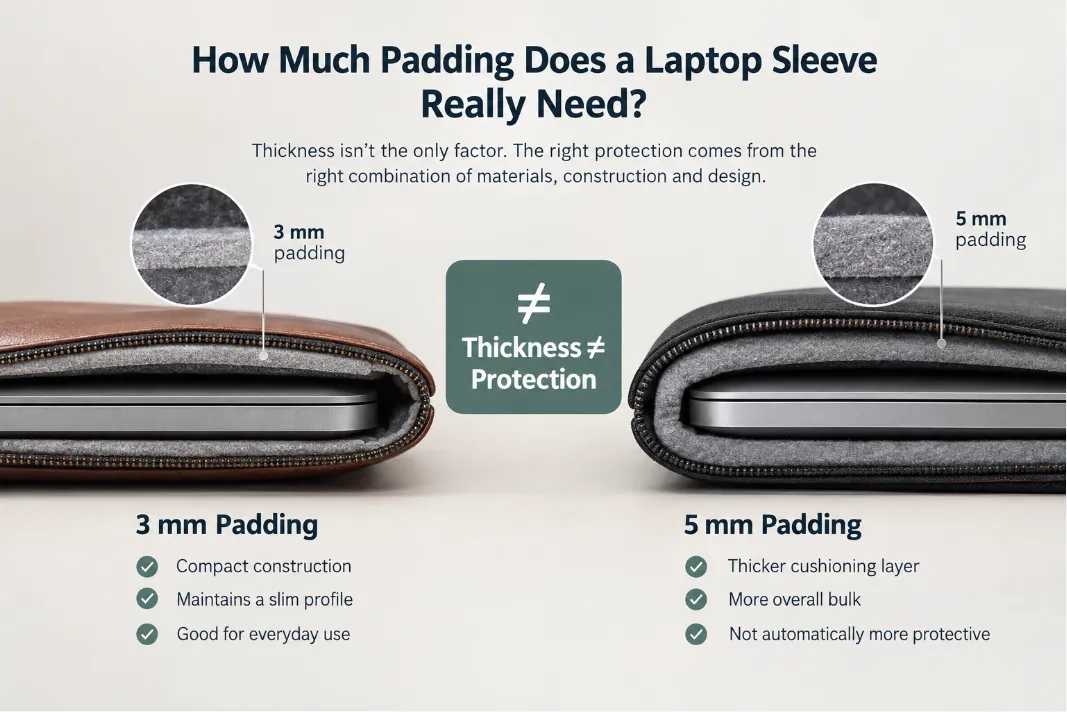
A 5 mm cushioning layer is not automatically more protective than a 3 mm layer. Likewise, a thin sleeve is not automatically less protective than a thick one.
For a custom laptop sleeve, the more useful question is:
What padding construction provides the required protection without adding unnecessary bulk?
There is no universal padding thickness that works for every sleeve. Instead, choose padding based on the sleeve’s intended use, protection target, material stack, and overall design.

Leather laptop sleeve for daily use
Does More Padding Mean More Protection?
Not necessarily.
Padding absorbs impact, distributes pressure, and creates a buffer between the laptop and external surfaces. However, its performance depends on the material itself and how it is integrated into the sleeve.
Adding more padding can also create drawbacks:
- Increased overall thickness
- Reduced usable space
- A tighter or less predictable fit
- More weight
- Greater bulk around seams and closures
- Reduced flexibility
- Higher material and manufacturing costs
This is particularly important for a slim leather laptop sleeve, where maintaining a refined profile may be part of the product’s design objective.
Instead of treating padding thickness as the primary protection specification, manufacturers should consider the complete material stack:
Protection requirement → Material construction → Padding performance → Overall thickness
This is more useful than simply adding more foam.
Padding, Cushioning, and Protection Are Not the Same Thing
These terms are related, but they describe different aspects of the design.
Padding is the physical material layer added to the sleeve.
Cushioning describes how that material responds to impact, pressure, and compression.
Protection is the result of the complete sleeve construction working together.
A sleeve may have substantial padding but still have weak protection if the laptop can move excessively, corners are poorly protected, or hard zipper components can contact the device.
Conversely, a relatively thin construction can provide useful everyday protection when the padding, lining, fit, clearance, and structural reinforcement are properly designed.
The key point is simple:
Padding is one component of the protection system, not the protection system itself.
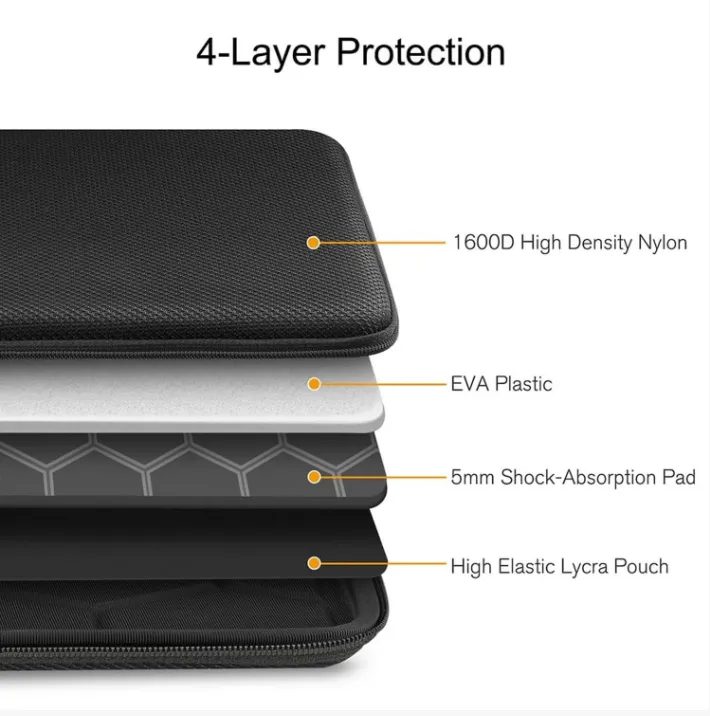
Protective layers
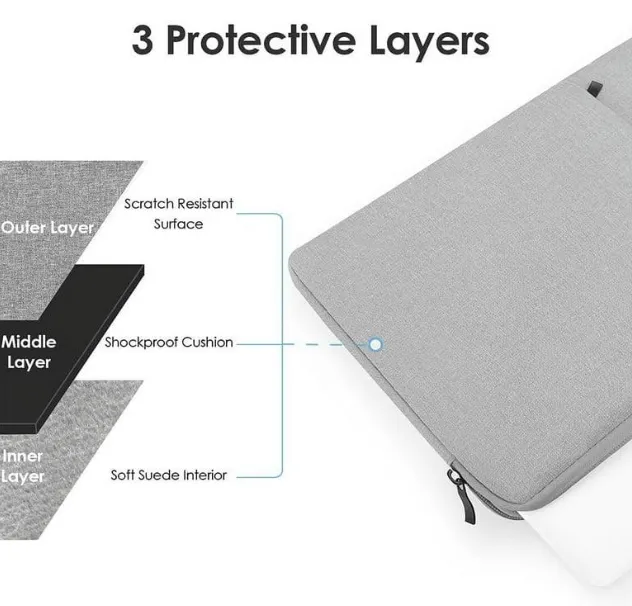
What Does Laptop Sleeve Padding Actually Do?
Padding generally performs three main functions.
1. Impact Absorption
When a sleeve receives an impact, cushioning can absorb and dissipate part of the force before it reaches the laptop.
This becomes particularly relevant when the sleeve is dropped or when the bag carrying it experiences an impact.
However, the effectiveness of this cushioning depends on the material and construction, not simply its unloaded thickness.
2. Pressure Distribution
Padding can help distribute external pressure over a larger area rather than allowing force to concentrate at a single point.
This matters during everyday carrying, especially when a laptop sleeve is compressed inside a backpack, briefcase, or suitcase.
3. Protective Separation
Padding creates a buffer between the laptop and external components.
This can help reduce direct contact with:
- Hard zipper components
- Seams
- Hardware
- Other accessories
- External surfaces
The important consideration is whether sufficient separation remains when the sleeve is actually loaded and compressed.
How Thick Should Laptop Sleeve Padding Be?
There is no universal number.
The appropriate padding construction depends on factors such as:
- Required protection level
- Intended use
- Padding material
- Material density and resilience
- Laptop dimensions
- Internal clearance
- Corner construction
- Accessory load
- Target overall thickness
A sleeve designed primarily for scratch prevention and light everyday contact does not necessarily require the same cushioning construction as one intended for daily commuting or frequent travel.
A useful design principle is:
Define the protection requirement first. Select the material construction second. Determine padding thickness third.
In other words, padding thickness should be an outcome of the design process rather than the starting point.
A Practical Padding Framework
| Intended Use | Main Protection Priority | Padding Approach |
|---|---|---|
| Light office use | Scratch and contact protection | Light cushioning + soft lining |
| Daily commuting | Impact + compression | Moderate cushioning + targeted protection |
| Frequent travel | Impact + repeated compression | More robust cushioning + reinforced areas |
| Slim premium sleeve | Protection + low bulk | Optimized material stack |
These are design directions rather than fixed thickness standards. The final construction should be validated with the actual laptop, materials, and intended load conditions.
Nominal Thickness vs. Effective Cushioning
One of the most important distinctions in sleeve development is the difference between nominal padding thickness and effective cushioning.
Nominal thickness is the measured thickness of the padding before significant external pressure is applied.
Effective cushioning is the protection that remains under actual use conditions.
For example, a padding layer may measure several millimeters when unloaded but compress considerably when a laptop is inserted or another object presses against the sleeve.
This means two sleeves with the same nominal padding thickness can behave very differently.
A useful evaluation therefore considers:
Thickness + compression behavior + material resilience + placement + overall construction
rather than thickness alone.
Compression and Recovery Matter
Padding should also be evaluated for how it behaves after compression.
Some cushioning materials compress easily and recover quickly. Others may remain compressed after repeated loading or gradually lose part of their original thickness.
A sleeve that is regularly carried inside a packed bag may experience repeated compression. If the cushioning does not recover effectively, the available separation and cushioning can change over time.
For this reason, compression and recovery behavior can be as important as initial padding thickness.
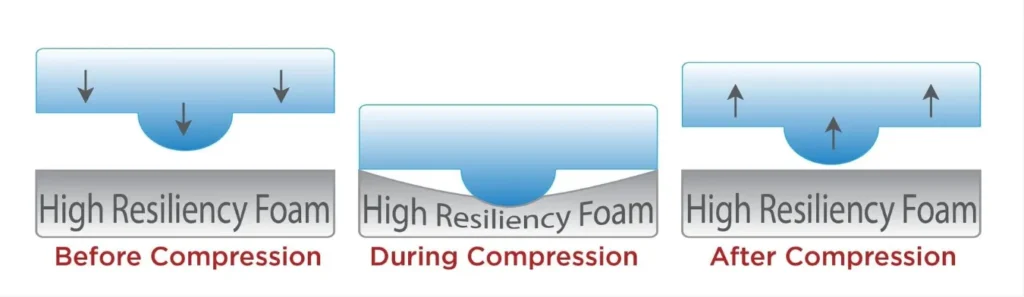
Compression and recovery
What Determines the Right Padding Construction?
The required padding should be determined by how the sleeve will actually be used.
1. Required Protection Level
Start by defining what the sleeve needs to protect against.
A lightweight office sleeve may prioritize:
- Scratch prevention
- Soft internal contact
- Low bulk
- Easy insertion and removal
A sleeve intended for daily commuting or frequent transportation may require greater attention to:
- Impact absorption
- Compression resistance
- Corner protection
- Edge protection
The construction should match the expected use conditions rather than automatically adding material.
2. Expected Compression
A sleeve is not exposed only to sudden impact.
It may spend hours compressed inside a backpack, briefcase, or luggage.
Other objects can press against the sleeve, reducing the available cushioning and separation between the laptop and external surfaces.
For this reason, padding should be evaluated under realistic compression rather than only by measuring its unloaded thickness.
3. Laptop Fit and Clearance
The sleeve should hold the laptop securely without making insertion unnecessarily difficult.
If the sleeve is too loose, the laptop may move inside the compartment.
If it is too tight, the laptop may compress the internal layers excessively and create stress around the opening and seams.
The goal is controlled clearance.
The sleeve needs enough room for smooth insertion and removal while limiting unnecessary movement inside the compartment.
4. Accessory Load
Accessories can significantly change the pressure inside a sleeve.
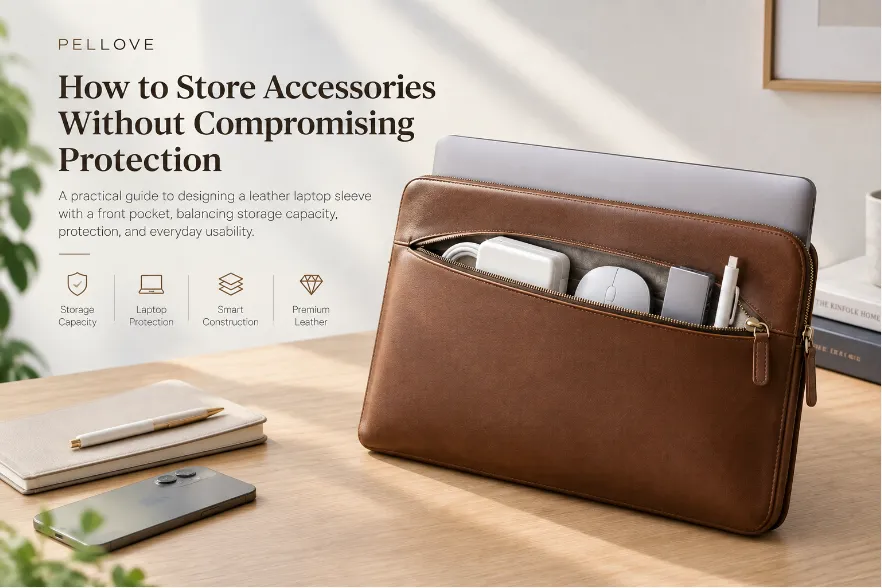
A charger, power adapter, mouse, or USB hub can create localized pressure when stored next to the laptop.
This is particularly important when the sleeve includes a front pocket.
The pocket should therefore be designed according to the expected accessory load rather than treated simply as additional storage.
For more detail, see Laptop Sleeve With a Front Pocket: How to Store Accessories Without Compromising Protection.
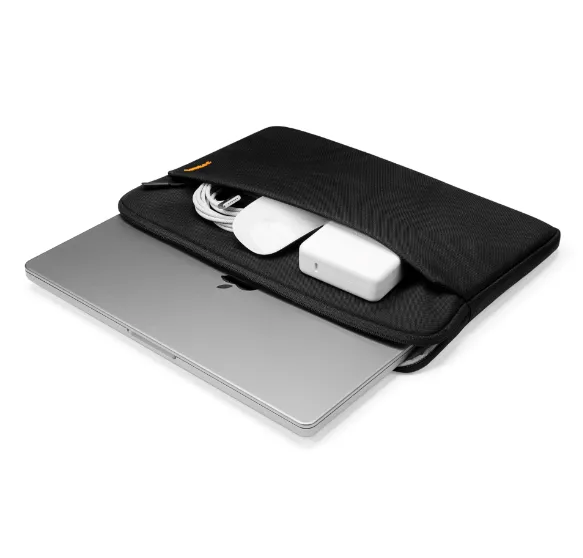
Front pocket loaded
5. Target Overall Thickness
For a premium slim sleeve, the overall material stack often matters more than the thickness of any individual layer.
A construction may combine:
Outer Material → Structural Layer → Padding → Soft Lining → Laptop
The objective is to achieve the required level of protection within a controlled total thickness.
Does Laptop Sleeve Protection Need to Be Uniform?
Not necessarily.
Different areas of a sleeve can experience different types of impact, pressure, and contact.
This means targeted protection can sometimes be more effective than simply increasing padding throughout the entire sleeve.
Corners
Laptop corners can receive concentrated impact during a drop.
Corner protection should therefore be considered separately from the flat panels.
Increasing padding across the entire sleeve may add bulk without addressing vulnerable areas as effectively as targeted cushioning or additional corner clearance.
Bottom Panel
The bottom of a sleeve may receive impact when a laptop is placed on a hard surface or when a bag is dropped.
Depending on the intended use, additional cushioning in this area may provide more useful protection than uniformly increasing the thickness of every panel.
Edges
Edges can experience impact, compression, and stress around seams and construction transitions.
The edge structure should therefore be evaluated together with padding and internal clearance.
Zipper Area
Padding cannot compensate for poor zipper positioning.
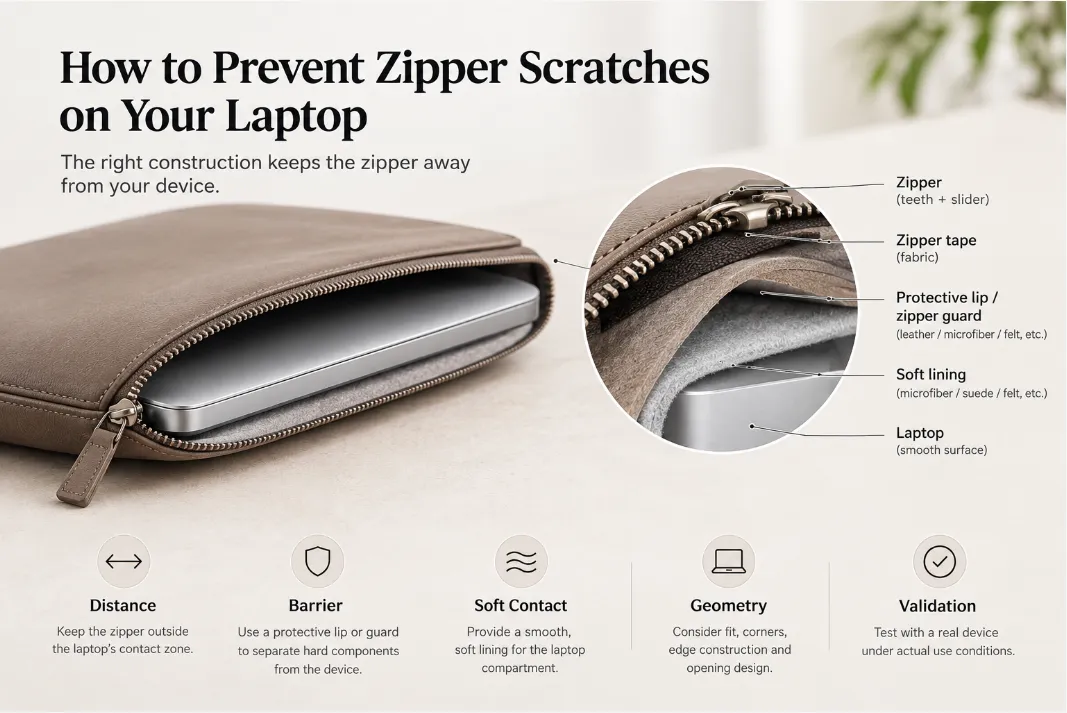
Hard zipper teeth, sliders, and zipper ends can become contact points if they are positioned too close to the laptop.
Adequate separation should therefore be created through the sleeve’s construction, clearance, protective layers, or zipper design.
For a deeper discussion, see How to Protect a Laptop from Zipper Scratches.
Padding vs. Lining: What Is the Difference?
Padding and lining perform different functions.
Lining primarily provides a soft contact surface and helps reduce scratching and abrasion.
Padding primarily contributes to cushioning, impact absorption, and pressure distribution.
A sleeve may therefore use a relatively thin cushioning layer while still providing a premium interior through materials such as:
- Microfiber
- Suede-like materials
- Felt
- Other soft textile linings
A soft lining can improve the interior feel and reduce surface abrasion without requiring a much thicker protective layer.
For this reason, padding and lining should be considered complementary layers, not interchangeable ones.
How Leather Changes the Padding Equation
Leather laptop sleeves require additional consideration because the outer material contributes to the sleeve’s overall structure and handling characteristics.
However, leather should not be treated as a substitute for dedicated cushioning.
Different leather constructions can behave differently depending on:
- Leather type
- Thickness
- Temper
- Surface treatment
- Backing
- Structural reinforcement
- Lining construction
A structured full-grain leather sleeve, for example, can have different stiffness and handling characteristics from a softer leather construction.
More importantly, leather thickness alone does not determine protection.
A thicker leather exterior does not automatically eliminate the need for cushioning, just as thicker padding does not automatically create better protection.
For a premium leather sleeve, simply increasing foam thickness can also work against the intended product profile by making the sleeve unnecessarily bulky.
A better approach is to balance:
Leather + Structural Reinforcement + Cushioning + Lining + Clearance
This allows the sleeve to provide practical protection while maintaining the appearance, hand feel, and slim profile expected from a premium leather product.
How to Validate Laptop Sleeve Padding
Padding should be evaluated under realistic conditions rather than only by measuring its thickness.
A practical development process can include the following stages.
1. Empty Sleeve
First check:
- Overall dimensions
- Visual appearance
- Material alignment
- Basic flexibility
- Seam and edge construction
This establishes the baseline construction before loading the sleeve.
2. Laptop Loaded
Insert the actual target laptop and check:
- Fit
- Internal clearance
- Insertion force
- Padding compression
- Corner coverage
- Contact points
This can reveal issues that are not visible when the sleeve is empty.
3. Laptop + Accessories
If the sleeve includes an accessory pocket, load it with representative items.
For example:
- Charger
- Power adapter
- Mouse
- USB hub
- Cables
- Documents
Check whether these items create localized pressure against the laptop compartment.
4. Closed Sleeve
Operate the zipper or closure while the sleeve is loaded.
Check:
- Zipper movement
- Slider position
- Internal contact points
- Compression around the opening
- Clearance between the closure and laptop
5. Compression Testing
Evaluate the sleeve under realistic external pressure.
The goal is to determine whether sufficient cushioning and separation remain when the sleeve is compressed.
For frequently used sleeves, repeated compression can also be evaluated to understand material recovery and dimensional stability.
The purpose is not simply to confirm that the padding is thick enough.
It is to determine whether the complete construction continues to perform as intended under realistic conditions.
How to Balance Protection and Bulk
A well-designed laptop sleeve does not maximize every specification.
It balances several requirements at the same time.
| Design Factor | Too Little | Balanced Approach | Too Much |
|---|---|---|---|
| Padding | Limited cushioning | Controlled impact absorption | Excessive bulk |
| Fit | Excess movement | Secure, controlled fit | Difficult insertion |
| Clearance | Hard contact points | Protective separation | Unnecessary space |
| Reinforcement | Weak structure | Targeted support | Excessive stiffness |
| Lining | Higher abrasion risk | Soft contact surface | Added bulk |
| Overall thickness | Limited protection | Slim and functional | Bulky profile |
For a slim premium sleeve, the goal is usually not to maximize padding.
It is to optimize the material stack.
A Practical Padding Design Process
For custom laptop sleeve development, padding should be treated as one variable within a larger engineering process.
A practical workflow is:
1. Define laptop dimensions
↓
2. Define the target protection level
↓
3. Identify likely impact and pressure points
↓
4. Select the material combination
↓
5. Determine the padding construction
↓
6. Check corner, edge, and zipper clearance
↓
7. Test with the actual laptop
↓
8. Test with representative accessories
↓
9. Evaluate compression and recovery
↓
10. Adjust the material stack
This process helps determine whether additional padding is actually necessary.
It also prevents a common design mistake: adding material simply because a thicker sleeve appears safer.
Frequently Asked Questions
Is thicker padding better for a laptop sleeve?
Not necessarily. Padding performance depends on material properties, compression behavior, placement, and the rest of the sleeve construction. A thicker layer may add bulk without providing a proportional increase in practical protection.
Does a leather laptop sleeve need foam padding?
Not necessarily. The required cushioning depends on the leather construction, internal structure, intended use, and target protection level. Leather can contribute to the sleeve’s structure and durability, but it should not automatically be considered a substitute for cushioning.
What is the best padding thickness for a laptop sleeve?
There is no universal thickness. The appropriate construction should be determined by the required protection, material stack, compression behavior, laptop fit, accessory load, and target overall profile.
Does padding thickness affect laptop sleeve fit?
Yes. Increasing padding can reduce available internal space and change the sleeve’s overall dimensions, insertion force, closure behavior, and usable space. Padding thickness should therefore be considered together with the laptop’s actual dimensions and the desired fit.
Final Takeaway
So, how much padding does a laptop sleeve really need?
There is no universal number.
The appropriate construction depends on the required protection level, material characteristics, compression behavior, laptop fit, accessory load, vulnerable areas, and target overall thickness.
For a slim leather laptop sleeve, the goal should not be to maximize foam thickness. Instead, the sleeve should use the right combination of outer material, structural reinforcement, cushioning, soft lining, clearance, and targeted protection.
Most importantly, padding should be evaluated under realistic conditions. A nominally thick layer can provide limited effective cushioning if it compresses too easily, while a carefully designed thinner construction can provide useful protection without unnecessary bulk.
For OEM/ODM laptop sleeve development, treat padding thickness as a design variable rather than a fixed specification. Validate the final construction through fit, loading, compression, recovery, and protection testing—not by padding thickness alone.