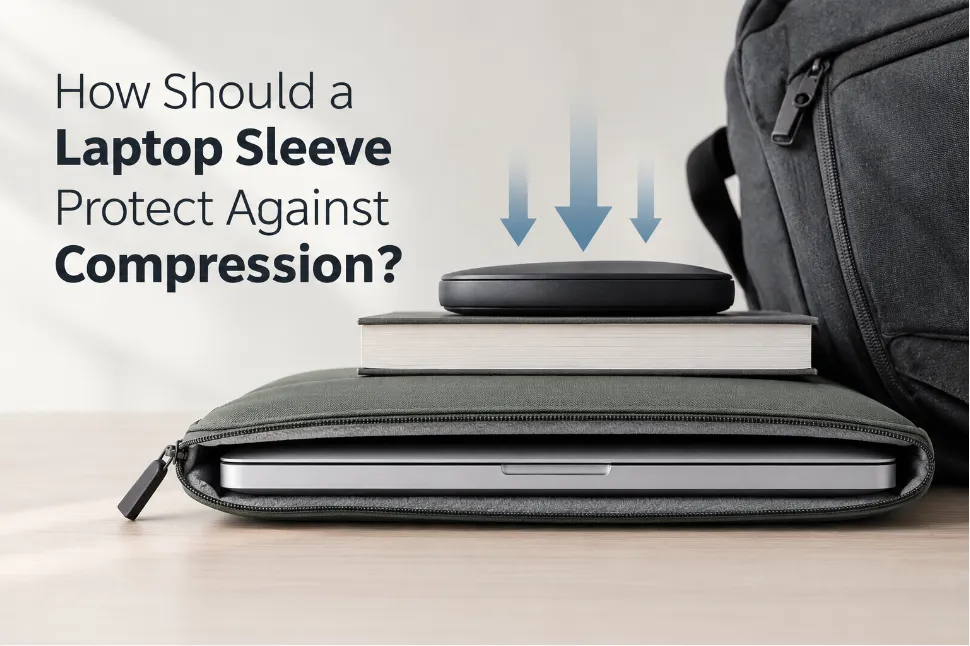

A laptop sleeve needs to protect a laptop from more than sudden drops and impacts. It may also be exposed to compression when packed inside a backpack, placed under luggage, squeezed between other products, or loaded with accessories.
Compression protection is different from impact protection. An impact involves a short, sudden force, while compression can apply an external load over a longer period. The sleeve therefore needs to manage deformation, load distribution, protective clearance, and hard contact points.
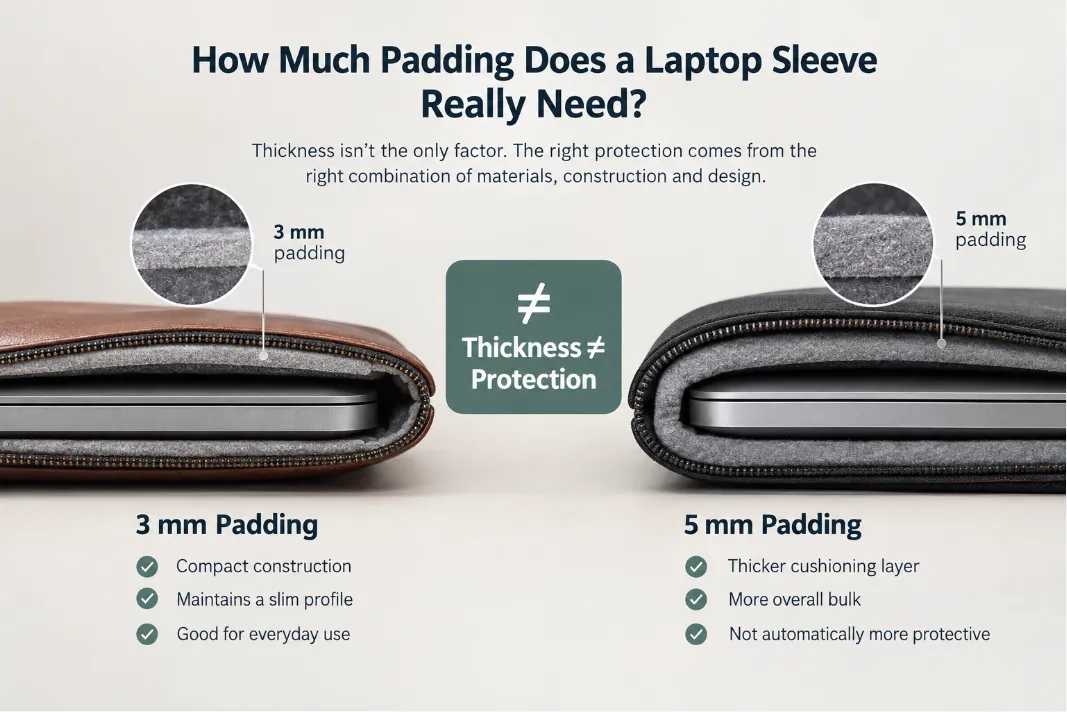
This is why adding thicker padding does not automatically create better compression protection.
For a custom laptop sleeve, the more useful question is:
How should the complete sleeve construction behave when external pressure is applied?
The answer depends on padding performance, reinforcement, protective clearance, laptop fit, outer material, zipper construction, accessory pockets, and how these components work together.
What Is Compression Protection in a Laptop Sleeve?
Compression protection is a laptop sleeve’s ability to control deformation and limit excessive load transfer to the laptop when an external force is applied.
Compression can occur when a sleeve is:
- Packed tightly inside a backpack
- Placed underneath heavier luggage
- Squeezed between other products
- Stored in an overfilled suitcase
- Pressed against hard objects
- Loaded with rigid accessories in an adjacent pocket
The key question isn’t just how much force is applied, but how that force travels through the sleeve.
A simplified compression load path is:
External load → outer material → structural layer → padding → lining → laptop
A well-designed construction distributes the load and gives the cushioning layer enough space to deform before hard components become contact points.
This means compression protection is not simply a question of padding thickness. It is a load-management problem involving the entire sleeve construction.
Compression Protection vs. Impact Protection
Compression and impact protection should be evaluated separately.
| Factor | Compression Protection | Impact Protection |
|---|---|---|
| Force | Sustained or gradually applied | Sudden and short-duration |
| Typical situation | Backpack or luggage pressure | Drop or collision |
| Main concern | Deformation and load transfer | Energy absorption and peak force |
| Important factors | Clearance, load distribution, compression resistance | Cushioning, impact absorption, structural protection |
| Potential failure | Excessive or localized pressure reaches the laptop | Shock is transmitted to the laptop |
The same material can behave differently under these two loading conditions.
A cushioning material may perform well during a short impact but compress significantly under a sustained load. If most of its usable deformation capacity is consumed, additional load may be transferred more directly through the construction.
In simple terms:
Impact protection manages sudden energy. Compression protection manages deformation and load transfer over time.
Both may be important, but they should not be treated as the same performance requirement.
How Does Compression Reach the Laptop?
External compression usually passes through several layers before reaching the laptop.
A typical sleeve may include:
- Outer material
- Structural or reinforcement layer
- Padding or cushioning layer
- Soft lining
- Laptop
Each layer has a different function.
Outer Material
The outer material contributes to abrasion resistance, shape retention, and overall structural behavior.
Leather, PU, textile, and other materials can respond differently to bending and compression.
Structural Layer
A reinforcement layer can help distribute a localized external load over a wider area.
Instead of allowing the load to remain concentrated at one contact point, the structure can help spread it before it reaches the cushioning layer.
Padding
Padding provides controlled deformation between the external load and the laptop.
Its performance depends on characteristics such as:
- Thickness
- Compression resistance
- Density
- Recovery
- Compression set
- Deformation behavior
Lining
The lining provides a soft surface around the laptop and helps reduce abrasion.
However, a soft lining should not be considered the primary compression-protection layer.
Laptop
The final objective is to prevent excessive or highly localized loads from reaching the laptop chassis, edges, and corners.
How Should Laptop Sleeve Padding Behave Under Compression?
Padding thickness is important, but thickness alone does not describe compression performance.
Two cushioning layers with the same nominal thickness can behave very differently under load.
Padding Thickness
Thickness determines how much material is initially available for deformation.
However, the useful protective capacity depends on how that material behaves as compression increases.
A 5 mm cushioning layer does not necessarily provide the same compression performance as another 5 mm layer.
Compression Resistance
Compression resistance describes the material’s resistance to deformation under load.
More specifically, it relates to how much force is required to produce a given amount of deformation.
Padding that is too soft may compress rapidly under an external load.
Padding that is excessively rigid may provide less controlled deformation and can also affect flexibility, weight, and the overall feel of the sleeve.
The appropriate balance depends on the intended application and construction.
Recovery
After the external load is removed, the padding should recover sufficiently to restore the intended protective space.
Poor recovery can gradually reduce the effective cushioning thickness after repeated use.
Compression Set
Compression set refers to permanent deformation that remains after a cushioning material has been compressed and unloaded.
If a material develops significant compression set, its original thickness and recovery characteristics may change over time.
For sleeves exposed to frequent compression, this can affect long-term protection.
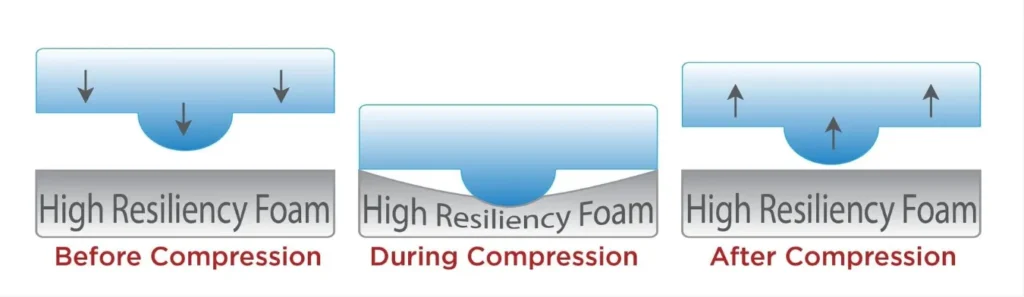
Compression and recovery
Why Can Padding Bottom Out?
One of the most important concepts in compression protection is bottoming out.
As external load increases, a cushioning layer progressively loses usable deformation space.
A simplified progression is:
Normal padding → compressed padding → highly compressed padding → limited cushioning capacity → increased load transfer
Bottoming out does not necessarily mean that the padding has become completely flat. It means that the remaining cushioning capacity is no longer sufficient to provide the intended level of controlled deformation under additional load.
Once the cushioning system approaches this condition, additional load can be transferred more directly through the sleeve structure.
This is why simply increasing nominal padding thickness is not always the most effective solution.
The material’s force-deformation behavior and usable cushioning space also matter.
Why Do Protective Clearance and Laptop Fit Matter?
Padding needs room to deform.
This makes protective clearance an important part of laptop sleeve compression protection.
Consider two sleeves with the same padding:
- Sleeve A provides sufficient clearance around the laptop.
- Sleeve B fits so tightly that little protective space remains.
When external compression is applied, Sleeve A has more room for the cushioning system to deform before hard components become contact points.
Sleeve B may transfer load more directly because the laptop is already tightly constrained by the surrounding construction.
This creates an important distinction:
Nominal padding thickness is not the same as usable cushioning space.
The available protective space can be affected by:
- Laptop fit
- Lining thickness
- Lamination
- Reinforcement
- Padding compression
- Construction tolerances
- Zipper placement
A sleeve should hold the laptop securely without eliminating the space required for the cushioning system to function.
Why Does Contact Area Matter in Compression?
Not all external loads create the same pressure distribution.
For a given external force, the resulting pressure depends partly on the contact area.
A large, relatively flat object can distribute a load across a broader area.
A small rigid object or sharp corner can concentrate the same general load over a much smaller area.
Conceptually:
Large contact area → broader load distribution → lower localized pressure
while:
Small contact area → concentrated load → higher localized pressure
This is why compression testing should consider not only the total external load, but also where and how that load is applied.
It also explains why corners, edges, zipper hardware, and rigid accessories deserve specific attention.
How Should Edges and Corners Be Protected?
Laptop edges and corners can experience localized compression because an external load may be concentrated over a relatively small contact area.
A sleeve can therefore have adequate cushioning across its main panels while still having weaker protection around the perimeter.
Depending on the design, manufacturers may consider:
- Corner cushioning
- Edge reinforcement
- Controlled seam placement
- Adequate perimeter clearance
- Reduced exposure to hard hardware
- Consistent padding around the laptop compartment
The goal is not necessarily to make every part of the sleeve equally thick.
The goal is to prevent localized external loads from becoming direct or excessive contact points against the laptop.
How Does the Outer Material Affect Compression?
The outer material contributes to the mechanical behavior of the sleeve, but material thickness alone does not determine compression performance.
For a leather laptop sleeve, compression behavior can be influenced by:
- Leather thickness
- Leather temper and flexibility
- Backing material
- Reinforcement
- Padding
- Lamination
- Panel construction
- Edge construction
- Stitching or bonding
- Overall panel tension
A thicker leather exterior may improve structure or shape retention in some constructions, but it does not replace a properly designed cushioning system.
For premium leather laptop sleeves, the outer leather should therefore be evaluated as part of the complete multilayer construction.
The objective is to balance the leather’s appearance and hand feel with the structural and protective requirements of the finished sleeve.
How Do Structural Layers Distribute Pressure?
Padding and reinforcement have different functions.
Padding provides controlled deformation.
Reinforcement helps distribute and manage localized loads.
Imagine a rigid object pressing against a small area of the sleeve.
Without adequate structural support, the load may remain concentrated near that contact point.
With appropriately designed reinforcement, the load can be distributed across a larger area before it reaches the cushioning layer.
The basic principle is:
Localized external load → structural distribution → controlled cushioning deformation → reduced localized pressure
However, reinforcement should not simply make the sleeve as rigid as possible.
Excessive stiffness can increase:
- Weight
- Bulk
- Manufacturing complexity
- Overall rigidity
- Difficulty of handling
The appropriate reinforcement depends on the intended use, sleeve dimensions, material selection, and target protection level.
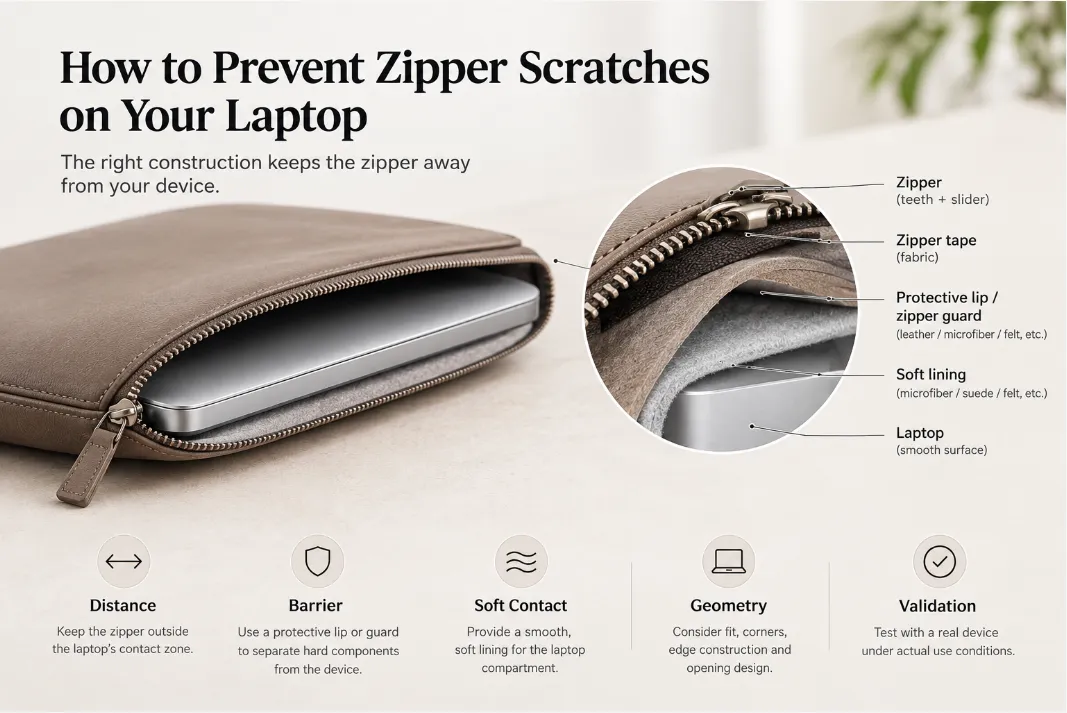
Can the Zipper Become a Compression Risk?
Yes. A zipper can become a potential compression contact point if its hard components are positioned too close to the laptop compartment.
Potential contact points include:
- Zipper teeth
- Slider
- Zipper ends
- Puller
- Other rigid zipper components
The risk becomes more relevant when external compression causes the zipper area to deform inward.
A simplified load path is:
External compression → zipper area deforms → clearance decreases → hard zipper component approaches laptop
The zipper itself is not automatically a protection problem.
The important factors are:
- Zipper position
- Clearance
- Zipper construction
- Protective barriers
- Relationship between the zipper and laptop compartment
Possible construction solutions include:
- Increasing the distance between the zipper and laptop
- Adding a protective zipper barrier
- Using an internal zipper flap
- Controlling zipper placement
- Maintaining sufficient clearance around the compartment
Zipper protection should therefore be considered during pattern and construction development, rather than treated only as a finishing detail.
How Do Accessory Pockets Affect Compression Protection?
Accessory pockets can create a different compression risk because the contents themselves can become internal pressure points.
The key issue is not simply accessory weight. It is the accessory’s:
- Rigidity
- Shape
- Size
- Position
- Contact area
- Distance from the laptop compartment
Consider a front pocket containing:
- Power adapter
- Mouse
- USB hub
- External SSD
- USB cable
- Documents
- Stylus
These items have very different physical profiles.
A flat document can distribute external pressure relatively easily, while a rigid power adapter may create a more concentrated internal load.
For example:
Backpack pressure → power adapter → pocket structure → laptop compartment → laptop
This means that increasing pocket capacity can unintentionally change the compression behavior of the entire sleeve.
The pocket should therefore be evaluated in relation to:
- Pocket depth
- Pocket position
- Expansion capacity
- Accessory profile
- Contact area
- Distance from the laptop
- Separation between compartments
A useful design principle is:
An accessory pocket should not unintentionally turn rigid accessories into hard pressure points against the laptop compartment.
Should a Laptop Sleeve Be Tested Empty and Loaded?
Yes, especially when the sleeve includes accessory storage.
An empty sleeve and a loaded sleeve can have significantly different mechanical behavior.
Empty Condition
Testing the empty sleeve helps evaluate:
- Overall deformation
- Padding distribution
- Structural stiffness
- Zipper position
- Edge and corner behavior
- Basic protective clearance
Loaded Condition
Testing with representative accessories evaluates a more realistic use condition.
Accessories can change:
- Pocket thickness
- Internal pressure distribution
- Localized load points
- Overall sleeve deformation
- Distance between accessories and laptop compartment
A sleeve may look very slim and uniform when empty but become substantially thicker or less uniform after a power adapter, mouse, or other rigid accessory is inserted.
Therefore:
The protection performance of an empty sleeve should not automatically be assumed to represent the loaded condition.
For OEM/ODM development, testing should reflect the configuration in which the product is expected to be used.
How Should a Laptop Sleeve Be Tested Against Compression?
Compression testing should be performed on the finished sleeve construction, not only on the raw padding material.
The exact load, loading area, duration, cycle count, and acceptance criteria should be defined according to the intended application and any applicable testing requirements.
Several test approaches can provide useful information.
| Test Type | Main Purpose |
|---|---|
| Static compression | Evaluate sustained external load |
| Repeated compression | Evaluate changes after repeated loading |
| Localized compression | Identify pressure-sensitive areas |
| Loaded-pocket compression | Evaluate accessory-induced pressure |
| Post-test inspection | Check permanent deformation and structural changes |
Static Compression
A controlled load is applied for a defined period.
The evaluation can include:
- Amount of deformation
- Load distribution
- Recovery after unloading
- Hard-component contact
- Change in protective clearance
Repeated Compression
Repeated loading can reveal problems that a single compression cycle may not show.
These may include:
- Padding fatigue
- Compression set
- Permanent deformation
- Loss of recovery
- Structural changes
Localized Compression
A concentrated load can help identify vulnerable areas around:
- Corners
- Edges
- Zipper zones
- Hardware
- Seams
- Pocket boundaries
Loaded-Pocket Compression
If the sleeve has accessory storage, include representative accessories during testing.
This helps determine whether the contents create localized pressure points against the laptop compartment.
Post-Test Inspection
Testing should continue beyond the moment when the load is removed.
The sleeve can be inspected for:
- Permanent deformation
- Padding recovery
- Compression set
- Delamination
- Damaged edges
- Zipper deformation
- Structural changes
- Loss of protective clearance
The objective isn’t simply to get a pass/fail result.
A useful compression test should help identify how and where the construction changes under load.
What Failure Modes Should Compression Testing Identify?
Compression testing becomes more useful when the manufacturer evaluates failure modes, rather than looking only for a pass/fail result.
Common failure modes can include:
Padding Bottoming Out
The cushioning layer loses sufficient deformation capacity under the applied load, increasing the possibility of greater load transfer.
Loss of Protective Clearance
The sleeve deforms enough that the intended separation between the laptop and a hard component is significantly reduced.
Localized Pressure Concentration
A zipper, corner, reinforcement edge, hardware component, or rigid accessory becomes a concentrated load point.
Permanent Deformation
The sleeve or cushioning material does not adequately recover after compression.
Compression Set
Repeated or prolonged loading permanently changes the cushioning layer’s thickness or deformation behavior.
Delamination or Construction Failure
Laminated layers, bonded components, or structural elements separate or change position under repeated loading.
Identifying the failure mode helps determine the appropriate corrective action.
For example:
Insufficient clearance may require a pattern adjustment.
Accessory-induced pressure may require a pocket redesign.
Padding bottoming out may require a different cushioning construction.
Simply adding more padding is not necessarily the correct solution.
Common Laptop Sleeve Compression Protection Mistakes
1. Assuming Thicker Padding Is Always Better
Thickness alone does not describe compression resistance, recovery, or bottoming-out behavior.
2. Ignoring Protective Clearance
A cushioning layer needs sufficient space to deform.
An excessively tight fit can reduce the available protective space.
3. Treating All Areas the Same
Corners, edges, zipper zones, and pocket boundaries can experience different loading conditions.
4. Ignoring Internal Accessories
Rigid accessories can create localized internal pressure points.
5. Testing Only Raw Padding
The finished sleeve can behave differently from the individual padding material because of lamination, reinforcement, lining, pattern construction, and fit.
6. Testing Only an Empty Sleeve
A loaded accessory pocket can substantially change the internal load path.
What Determines the Required Compression Protection?
There is no single compression specification that applies to every laptop sleeve.
The required protection level depends on several factors:
Intended Loading Environment
A sleeve carried inside a lightly packed work bag may experience different compression conditions from one regularly transported in crowded luggage.
Accessory Configuration
A sleeve carrying a power adapter, USB hub, mouse, or other rigid accessories may require different pocket and compartment construction.
Product Positioning
A lightweight everyday sleeve may prioritize low bulk and portability, while a premium travel sleeve may place greater emphasis on structural protection and long-term durability.
Material and Construction
Leather thickness, reinforcement, padding, lining, zipper position, pocket construction, and clearance all influence the final behavior.
Therefore, the target should not simply be:
Maximum compression protection
It should be:
Appropriate compression performance for the intended use case.
How Should Compression Protection Be Developed for a Custom Laptop Sleeve?
For OEM/ODM projects, compression protection should be developed as part of the product engineering process.
1. Define the Use Case
Start by identifying:
- Target laptop models
- Carrying environment
- Expected accessories
- Pocket configuration
- Expected compression conditions
- Frequency of use
2. Develop the Construction
Balance:
- Outer material
- Padding
- Reinforcement
- Protective clearance
- Laptop fit
- Zipper position
- Pocket configuration
- Edge construction
The objective is to create a complete load-management system rather than maximize a single material specification.
3. Prototype the Finished Construction
The first sample should be evaluated as an assembled product.
Check:
- Laptop fit
- Clearance
- Padding distribution
- Structural behavior
- Zipper position
- Pocket capacity
- Empty and loaded configurations
4. Test Relevant Loading Conditions
Depending on the intended product, evaluation may include:
- Static compression
- Repeated compression
- Localized compression
- Loaded-pocket compression
- Post-test inspection
5. Analyze Failure Modes
If a problem occurs, identify the mechanism before changing the construction.
For example:
Localized pressure → insufficient clearance
may require a pattern or zipper-position adjustment.
Accessory pressure → rigid internal load point
may require a pocket redesign.
Padding bottoming out → insufficient cushioning capacity
may require a different material or construction.
This development approach helps manufacturers refine the sleeve without unnecessarily increasing bulk, weight, or material usage.
What Should OEM/ODM Buyers Ask Their Laptop Sleeve Manufacturer?
When developing a custom laptop sleeve, buyers should specify more than the outer material and nominal padding thickness.
Product Specification
Ask the manufacturer to confirm:
- Target laptop dimensions
- Compatible device models
- Internal compartment dimensions
- Expected accessories
- Pocket configuration
- Intended use conditions
Construction Specification
Discuss:
- Outer material
- Material thickness
- Padding material and thickness
- Reinforcement
- Lining
- Zipper construction
- Edge construction
- Lamination method
Protection Specification
Define:
- Expected compression conditions
- Empty and loaded configurations
- Localized pressure areas
- Protective clearance
- Repeated compression requirements
- Relevant test conditions
Acceptance Criteria
The project should also define what constitutes acceptable performance, such as:
- No harmful hard-component contact
- Acceptable deformation
- Adequate padding recovery
- No critical structural damage
- No unacceptable loss of clearance
- No significant delamination or construction failure
These specifications turn compression protection from a general marketing statement into a defined product-development requirement.
Final Takeaway
A laptop sleeve does not protect against compression simply by adding more padding.
Effective laptop sleeve compression protection depends on how the padding, reinforcement, clearance, fit, outer material, zipper, accessory pockets, and overall construction work together.
The basic load-management principle is:
External load → controlled deformation → load distribution → sufficient clearance → reduced load transfer to the laptop
Padding provides controlled deformation. Reinforcement helps distribute localized loads. Clearance gives the cushioning system room to work. Proper fit holds the laptop securely without eliminating protective space. Zipper and accessory-pocket design help prevent hard components from becoming internal pressure points.
For OEM/ODM laptop sleeve development, the key question is therefore not:
How thick should the padding be?
It is:
How should the complete sleeve construction behave when compressed?
For brands developing custom leather laptop sleeves, these variables should be coordinated during material selection, pattern development, prototyping, compression evaluation, and production refinement.
Compression protection is not a thickness competition. It is a construction-engineering problem.